
Fiix vs IBM Maximo: In-Depth Comparison [2026 Guide]
On paper, Fiix and IBM Maximo have a lot of overlap: they target similar industries, streamline maintenance execution, offer deep integration ecosystems, and provide the necessary data for running effective reliability and predictive programs.
In practice, however, they're built for a different scale of operation. Picking the wrong one means either outgrowing your CMMS or paying enterprise money for depth you'll never touch.
In this comparison, we break down the key differences between Fiix and Maximo, then look at each platform in detail: features, pricing, and what real users like and dislike about them.
By the end, you'll know which one fits your operation, and when a third option like Limble makes more sense.
Fiix vs IBM Maximo at a glance
Fiix offers a comparatively straightforward path to modern CMMS capabilities, while Maximo delivers enterprise depth that only pays off if your operation is complex enough to need it.
Both offer work order management, preventive and predictive maintenance, robust asset tracking, and a passable mobile experience. What separates them is how much organizational effort — time, money, expertise, and administration — each demands in return.
Key differences between Fiix and IBM Maximo
The best way to decide between two solutions is to understand what they do differently. With that in mind, here's a deeper dive into core differences between Fiix and Maximo:
- Deployment and implementation complexity: Fiix is a cloud-based SaaS platform, and Rockwell offers tiered implementation packages that scale from self-serve setup for small facilities to full-service rollouts with data migration and configuration support. Maximo Application Suite runs on Red Hat OpenShift and can be deployed on-premises, in the cloud, or hybrid. Due to its depth, Maximo typically involves containerized infrastructure, integration work, and staged rollout across modules — taking significantly longer to implement, learn, and adopt.
- Total cost of ownership: License price is only the starting point. With Maximo, you're also budgeting for infrastructure, configuration, integrations, ongoing administration, upgrades, and training across a multi-application suite licensed through IBM's AppPoints model. Because of that depth, Maximo deployments are commonly run with certified implementation partners. Fiix is not the cheapest CMMS, but its implementation and ongoing costs should be significantly lower
- CMMS vs enterprise asset management depth: Fiix covers the core of maintenance management — work orders, preventive and predictive maintenance, parts and inventory, reporting, and a mobile app. Maximo goes beyond that into enterprise asset management, offering full asset lifecycle management, asset performance management, and capital planning.
- Compliance and asset criticality: Maximo is built for asset-intensive, heavily regulated environments — utilities, oil and gas, transportation, nuclear — with embedded security, data governance, auditability, and reliability-centered maintenance for critical infrastructure. Fiix supports compliance tracking and audit trails and is well-suited to less demanding regulatory environments, but it isn't engineered for the same tier of formal controls and asset criticality.
- Customization levels: Fiix offers configuration such as custom fields, customizable work order forms, and a workflow engine for automation — though several of these sit on the Enterprise tier. Maximo offers deeper levels of customization, which is part of why it carries heavier implementation and administration demands.
Fiix overview: Key features, use cases, pricing, pros, cons & user reviews
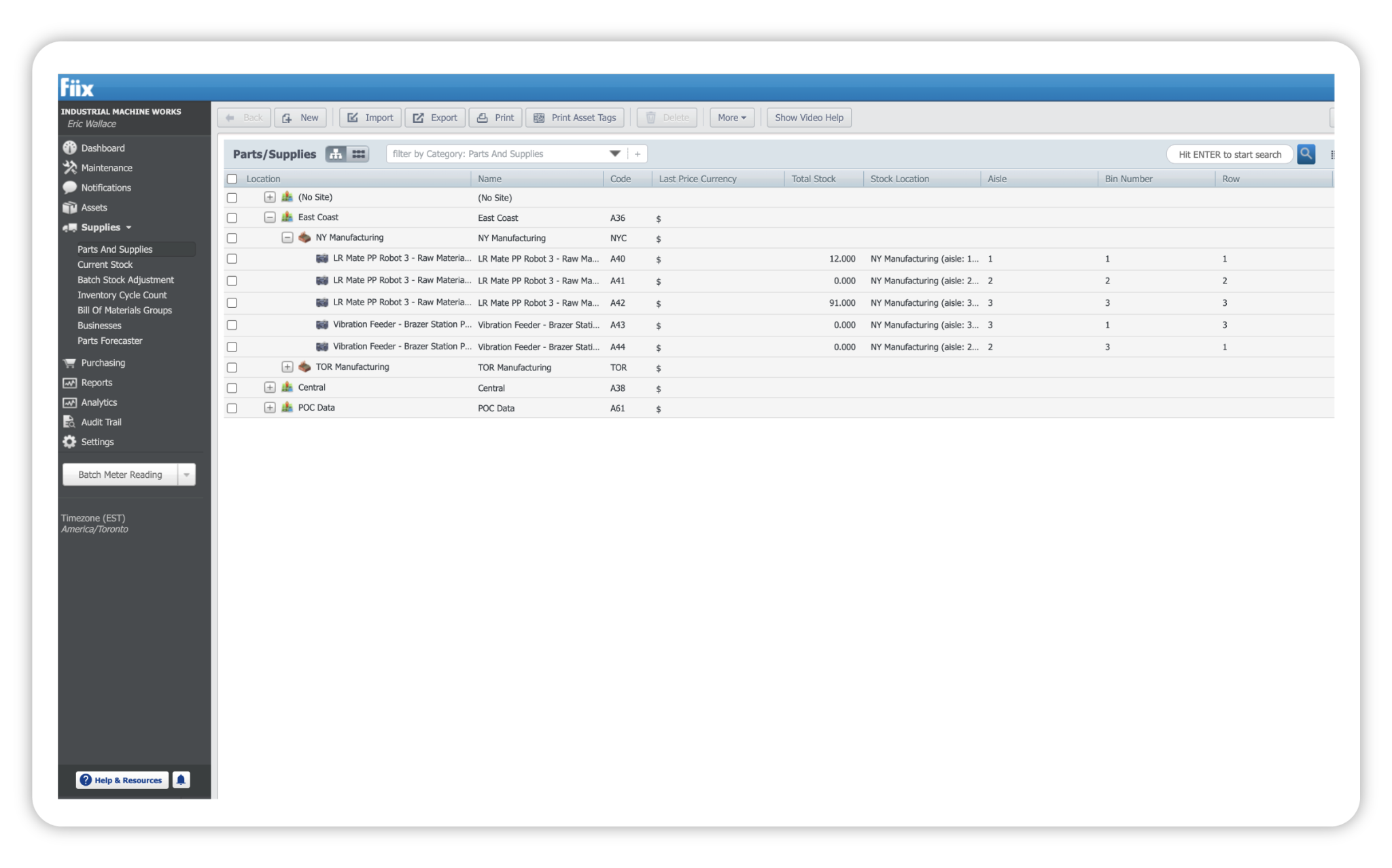
Fiix is a cloud-based CMMS for industrial and manufacturing teams that want modern maintenance capabilities without the weight of a full enterprise asset management (EAM) suite. Compared to Maximo, Fiix is faster to deploy and far less complex to run, but lacks some of the EAM features found in Maximo.
Fiix holds a 4.6/5 rating on G2 (477 reviews) and a 4.5/5 rating on Capterra (628 reviews). Reviewers most often praise its ease of use, the paperless mobile workflow, and responsive customer support. The most common complaints, some of which may push you to explore Fiix competitors, center on the Looker-based custom reporting, sluggish performance with large data sets, and inflexible contract handling.
Key features
- Work order management: Create, assign, prioritize, complete, and track maintenance work from a single place. Technicians can raise and action work orders on desktop or the mobile app, attach photos and documents, and log parts and time as they go.
- Asset management: Build drag-and-drop asset hierarchies, store full equipment information and maintenance history, and pull up any asset in the field with QR or barcode scanning.
- Preventive maintenance: Schedule recurring PMs using date, time, meter, event, or condition-based triggers, and roll inspections and nested PMs into the same plan so routine work generates itself.
- Mobile CMMS: The mobile app is built for technician workflows — creating and updating work orders, scanning assets, and logging work in the field, with offline access so nothing stalls when connectivity drops.
- Fiix AI and analytics: Fiix Foresight adds three AI dashboards — Work Order Insights flags orders at risk of delays, Parts Forecaster predicts upcoming parts usage to head off stockouts, and Asset Insights sets a maintenance baseline per asset and alerts you when you drift above or below it. Fiix MAX, a newer add-on, is a conversational assistant you can ask plain-language questions about assets, history, work orders, and parts.
- Condition-based and predictive maintenance: The Asset Risk Predictor (ARP) pulls sensor and OT-layer data, uses machine learning to learn what "normal" looks like for each asset automatically, and detects anomalies before failure. It can then auto-generate GenAI prescriptive work orders when risk crosses a threshold.
- Integrations: The Integration Hub offers an open API plus prebuilt apps and connectors to link Fiix with ERP, IoT, and industrial control systems across thousands of endpoints. Because Rockwell owns both Fiix and a major PLC and FactoryTalk ecosystem, connecting sensor and control data tends to be more native than with other CMMS systems.
Pricing plans
Fiix publishes transparent, tiered pricing with a genuinely free entry point:
- Free ($0, limited users): 25 active PMs, unlimited service requests, work orders, downtime tracking, asset management, inventory and parts, the mobile app, and calendar access.
- Basic ($45/user/month): Everything in Free, plus unlimited PMs, reports, resource-based scheduling, user certification tracking, pass/fail inspections, and email, phone, and success team support.
- Professional ($75/user/month): Everything in Basic, plus multi-site management, Fiix Foresight, purchasing and RFQs, nested PMs, multi-asset work orders, inventory cycle counts, advanced notifications, and custom analytics and reports.
- Enterprise (custom): Everything in Professional, plus failure codes, a customizable interface and workflows, the Fiix Integration Hub, custom API integrations, e-signatures, audit trail, and single sign-on.
Two add-ons are priced on request:
- Lite License: Grants limited access to operators and frontline teams completing assigned tasks. It must be combined with a Basic, Professional, or Enterprise plan.
- Fiix MAX: An AI maintenance assistant that answers questions using your own maintenance records. It requires a Professional or Enterprise plan and can't be added to Lite License users.
What users like about Fiix
- Does the basics right. ["Fiix offers great CMMS features and makes maintenance planning, reporting, and tracking easy." — Susan, Capterra]
- Easy to learn and uncluttered to work in. ["The best thing about Fiix CMMS is how easy and organized it makes maintenance work. You don't feel confused or overloaded." — Udhay, G2]
- Strong analytics for improving asset reliability. [“FiiX analytics and an array of customizable dashboards have helped our maintenance team shift focus toward planned and predictive maintenance. Our next phase will be to roll out FiiX Asset Predictor, which will help sustain our OEE and availability KPIs, helping us reach our potential business output.” — Cliff, G2]
- Good customer support, especially during onboarding. ["Although we are still in the early stages of setup, we've received incredible support, and everything is progressing very smoothly." — Deana, G2]
What users dislike about Fiix
- Custom reporting has a steep learning curve: ["Building analytics pages in Fiix CMMS can be challenging, especially when it comes to displaying complex tables or charts. There is a learning curve associated with using the Looker programming language, which can be difficult to work with initially." — Tom, G2]
- Performance can lag when the data set gets large: ["The system becomes little slow when loading very large data sets." — Gaurav, G2]
- Some areas lack customization options. [“I wish there is more flexibility in managing fields in the different screens. While I like the Localization, ability to add custom fields, and to rearrange fields, there are some limited capabilities.” — Mel, Capterra]
- Rigid contract and subscription handling: ["I asked to downgrade from a premium subscription to a basic one, and was told that wasn't allowed. Not 'not right now,' not 'let's find a solution,' just a flat no… No path for escalation." — Joshua, G2]
IBM Maximo overview: Key features, use cases, pricing, pros, cons & user reviews
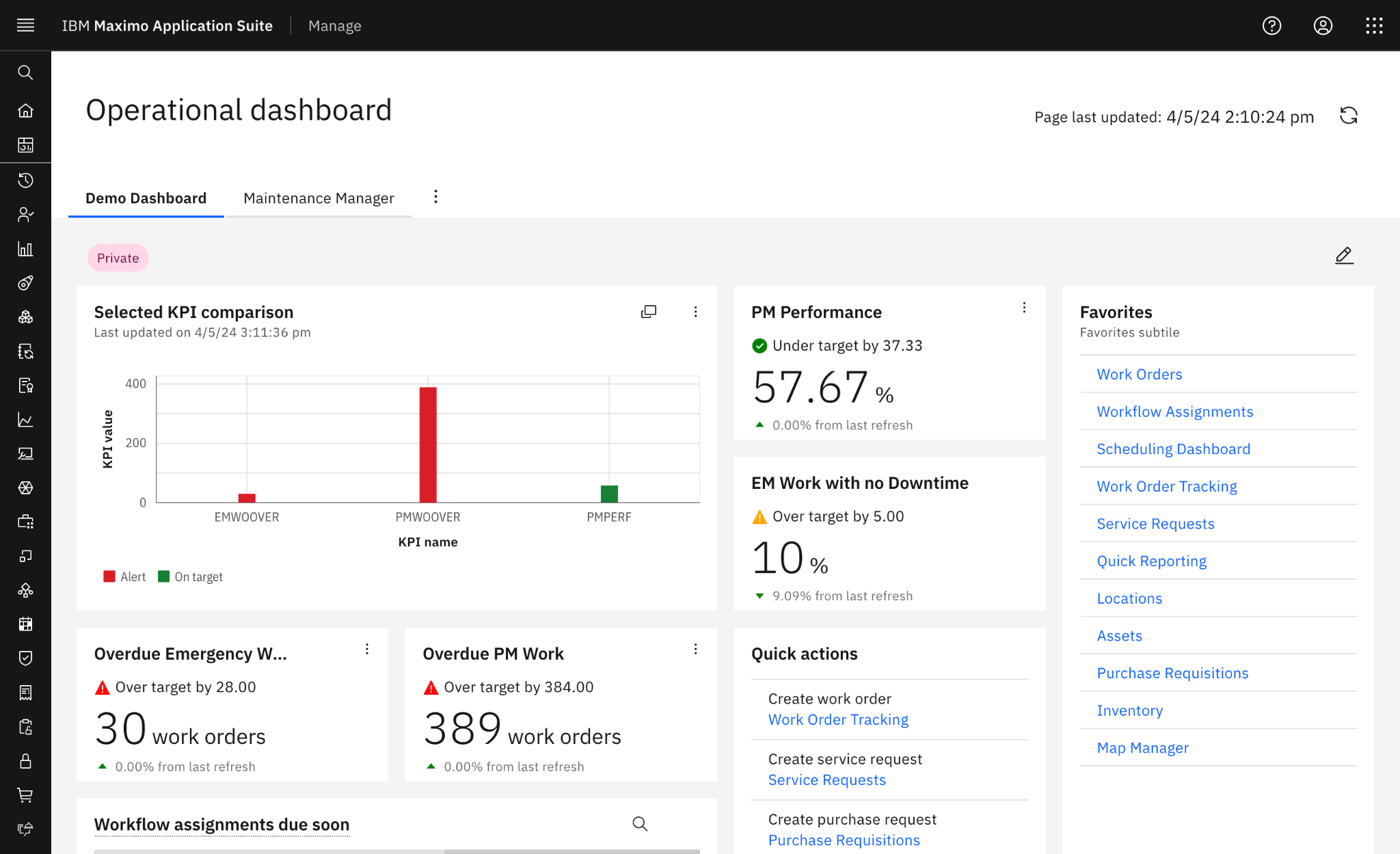
IBM Maximo Application Suite is an EAM platform that manages the full asset lifecycle across asset-intensive, heavily regulated industries like utilities, oil and gas, and manufacturing. It goes well beyond a standard CMMS, bundling maintenance, reliability, asset health, and predictive capabilities into one modular suite.
IBM Maximo holds a 4.4/5 rating on G2 (631 reviews) and a 4.2/5 rating on Capterra (83 reviews). Reviewers most often praise its deep asset management, configurability across industries, and organization-wide scalability. The most common complaints that push companies to look for alternatives to Maximo are the steep learning curve, complex and lengthy implementations, and the cost of licensing and infrastructure.
Key features
- Enterprise asset management: Maximo's core is full asset lifecycle management — building detailed asset hierarchies and tracking each asset's history, condition, costs, criticality, and performance from acquisition through to disposal. It's built to manage very large and complex asset estates, where hundreds of thousands of interconnected assets across multiple sites need to live in one system of record.
- Work order management: You can plan, schedule, assign, track, and document maintenance work. Maximo supports multi-asset work orders, job plans, failure codes, asset classifications and specifications, and configurable approval routing — the kind of structured, rules-driven work management that large organizations need to standardize how work gets done.
- Preventive and condition-based maintenance: Like most maintenance platforms, Maximo can trigger work orders based on time, meter readings, asset condition, or events.
- Asset monitoring and predictive maintenance: Maximo's asset performance management applications (Health, Monitor, and Predict) pull operational, IoT, inspection, and maintenance data into a single asset health score, flag anomalies, and predict likely failures so you can prioritize the right corrective action before disruption.
- Planning and scheduling: Maximo helps coordinate labor, crews, resources, and job plans, and automates scheduling and approvals for planned and corrective maintenance. This matters most for large maintenance organizations juggling many technicians, shifts, and competing priorities across sites.
- Compliance, inspections, and governance: Security and data governance are embedded into the suite to help meet regulatory requirements across on-premises and cloud deployments. You get configurable inspection forms, structured approval routing, role-based permissions, and a full audit trail.
- Integrations and enterprise ecosystem: Maximo is designed to connect maintenance to the wider enterprise (ERP, finance, procurement, GIS, IoT, and other operational systems) via APIs and its integration framework. This is Maximo’s genuine strength, but it's also a source of complexity.
Pricing plans
Maximo is licensed through IBM's AppPoints model and priced by configuration, so there's no simple public per-user price. IBM offers a pricing estimator for planning, but every figure it produces is an estimate, not a formal quote.
The suite comes in three packages:
- Essentials: The entry-level tier, aimed at clients new to Maximo who want faster time to value. IBM's example estimate for up to 25 users and one environment comes to roughly $4,260/month.
- Standard: The full-portfolio tier, adding access to predictive maintenance, remote monitoring, visual inspection, MRO inventory optimization, and enterprise integrations (ERP, HCM, SCM). IBM's example estimate for five concurrent and five authorized users at 311 AppPoints — covering the Manage and Health applications — comes to roughly $10,170/month.
- Premium: A fully custom configuration for highly complex deployments, built for maximum operational flexibility and IBM's premium services. Pricing is bespoke.
Those figures are IBM's own planning estimates, exclude tax, and already assume potential IBM discounts. Actual cost shifts with your configuration, add-ons, environments, users, and service, so you'll need a quote directly from IBM or an authorized Business Partner.
What users like about IBM Maximo
- Asset management depth built for complex operations: ["The depth of asset management it delivers right out of the box. The hierarchical asset structure, work order management, and PM scheduling feel mature, and they handle complex industrial environments that lighter CMMS tools simply can't." — Ramzi, G2]
- Breadth and configurability across industries: ["The breadth of capabilities it brings together in a single platform and the flexibility it offers to support different industries and business processes." — Francisco, G2]
- Strong maintenance and work management automation: ["I like the ability to automate maintenance and asset management in IBM Maximo Application Suite… Creating work orders automatically is a significant feature for me." — Dinesh, G2]
- Scalability across the whole organization: ["I appreciate the flexibility and scalability of the IBM Maximo Application Suite. Its containerized architecture is a standout feature, as it allows the software to scale seamlessly across an entire organization." — Khushivant, G2]
What users dislike about IBM Maximo
- A steep learning curve: ["Maximo is powerful, but the learning curve is definitely high. New users may find the interface overwhelming at first because there are so many modules and configuration options." — Verified User, G2]
- An unintuitive, click-heavy interface: ["The user interface can be complex and not very intuitive, especially for new or occasional users. It often requires multiple clicks to complete basic tasks." — Jeremiah, G2]
- High cost of licensing and infrastructure: ["The cost of implementing and maintaining IBM Maximo Application Suite, including the software itself and any associated services, can be substantial." — Bima, Capterra]
- Complex, lengthy implementations: ["The overall complexity of implementation and customization. The platform is extremely feature-rich, but that also means onboarding can take significant time and planning, especially for organizations with large or highly customized operational environments." — Arkajit, G2]
The verdict: When to opt for Fiix vs IBM Maximo?
Choosing between these two often comes down to a single trade-off: how much enterprise depth do you actually need, and how much implementation effort and cost are you willing to take on to get it?
Opt for Fiix if:
- You operate in a heavy industry and want a modern CMMS your team can deploy and adopt quickly, without a heavyweight implementation project or specialist consultants.
- Your maintenance needs center on work orders, PMs, mobile workflows, and practical AI insights rather than full asset lifecycle management.
- You run (or plan to run) Rockwell equipment and want native paths to FactoryTalk, PLC, and sensor data for condition-based maintenance.
- Predictable per-user pricing matters to your organization, and your budget doesn't stretch to enterprise EAM territory.
Opt for IBM Maximo if:
- You manage a large, complex asset estate across multiple sites and need one enterprise system of record for the full asset lifecycle.
- You operate in a heavily regulated industry — utilities, oil and gas, transportation, nuclear — where auditability, formal controls, and standardized processes are non-negotiable.
- You need deep customization of workflows, approvals, and integrations with ERP, finance, procurement, and GIS systems.
- You have the budget, IT resources, and implementation partners to deploy and administer an enterprise EAM platform properly.
There might not be a need to compromise. If Fiix feels a step short on depth but Maximo's complexity and cost feel like overkill, Limble sits in the sweet spot: you get enterprise-grade asset management, wrapped in a platform technicians can pick up quickly and actually enjoy using.
Limble: A better alternative to Fiix and IBM Maximo
Limble is a maintenance solution for modern enterprises built around a different notion: enterprise depth, without the learning curve tax.
Here’s what Limble does better than Fiix and Maximo:
- Value in weeks, not years: Enterprise CMMS implementation often takes 6 to 12 months — and Maximo deployments sit firmly in that territory. Limble customers often see value in the first month, thanks to a structured onboarding process and 24/7 hands-on support.
- An amazing mobile app: Both Fiix and Maximo have a mobile app, but users are not too happy with their mobile experience. Limble offers a more intuitive app that comes with all of the bells and whistles, like the offline mode, mapping, and QR code scanning.
- Modular predictive maintenance: Plug-and-play condition monitoring sensor setup with real-time, actionable data on asset condition and failure modes. Integrations with AssetWatch, Augury, Aveva, Monnit, Samsara, and more; no proprietary hardware ecosystem or separately priced add-on required.
- Reports that are easy to configure: Maximo and Fiix have good reporting, but sometimes they can feel like you need a PhD to pull up and compile the right data. Limble simplifies the process with many pre-built CMMS reports and dashboards to choose from, as well as an intuitive widget builder.
- Practical AI: AI is built into everyday workflows — think PM builder, scheduling optimization tips, MCP server, resource forecasting, anomaly detection, and more. Super practical; not something you will have to pay for but never utilize.
- Unbelievably fast support: If you think we are exaggerating, know that our median support response time is 15 seconds. When you submit a ticket or ask a question, you won’t have to wait until the next shift to get a helpful answer.
Don't just take our word for it — here's what happens when maintenance teams across industries make the switch:
- Sulzer, a global industrial engineering firm with 180 manufacturing facilities and service centers worldwide, was running maintenance on paper — with a 49% on-time work order completion rate and repairs sometimes starting days after a work order was raised. With Limble, they went paperless, put real reporting in front of management for the first time, and got downtime back under control.
- Rimex faced the classic multi-site problem: growing production, inconsistent maintenance protocols across facilities, and no reliable data to plan around. With Limble, they standardized processes across sites, increased planned work by 25%, cut unplanned work by 17%, and reduced downtime by 30%.
If you are concerned about the downsides that come with Fiix or Maximo, Limble might just be the better fit.
The only way to know for sure is by scheduling a personalized product demo. We will show you what Limble can do and discuss how it can meet your operational needs.