
UpKeep vs IBM Maximo: Side-by-Side Comparison [2026 Guide]
Choosing between UpKeep and IBM Maximo comes down to a simple tradeoff: Do you prioritize ease of use and fast frontline adoption, or deep customization and enterprise functionality?
UpKeep takes a mobile-first approach to maintenance management. It helps teams track assets and inventory, and plan and execute maintenance work faster. Fast to implement, fairly easy to learn and use. However, organizations with complex asset management requirements may need more depth than this streamlined CMMS provides.
IBM Maximo Application Suite, by comparison, supports a much broader range of enterprise functionality, including asset lifecycle management, reliability and predictive analytics, deep ERP integrations, and more. Of course, such breadth comes with greater implementation complexity and higher costs.
This guide breaks down the critical differences between the two. We will compare their functionality, cost, and user sentiment and introduce a third option for maintenance teams that need more capability than UpKeep without taking on Maximo’s enterprise overhead.
Key differences between UpKeep and IBM Maximo
UpKeep and Maximo are built for very different levels of operational complexity.
UpKeep is a mobile-first CMMS designed to make day-to-day maintenance easier to manage for technicians, supervisors, and maintenance teams. It combines work orders, preventive maintenance, asset tracking, inventory, reporting, and mobile access in one cloud-based platform. While UpKeep has expanded into areas such as AI, IoT monitoring, safety, and multi-site management, its core strength remains simplifying maintenance execution.
IBM Maximo Application Suite is a broader enterprise asset management (EAM) platform built for organizations managing large and complex asset portfolios. It goes beyond maintenance execution into full asset lifecycle management, reliability, asset health, prescriptive maintenance, inventory, procurement, and industry-specific workflows.
Here’s a quick side-by-side comparison:
The biggest distinction is not simply that Maximo has “more features.” UpKeep is centered on making maintenance work easier to execute, while Maximo is designed to support much broader and more complex asset management requirements.
That difference affects everything from implementation and pricing to customization, mobile workflows, and the amount of administrative expertise you need to configure and maintain the system.
UpKeep overview: Key features, use cases, pricing, pros, cons & user reviews
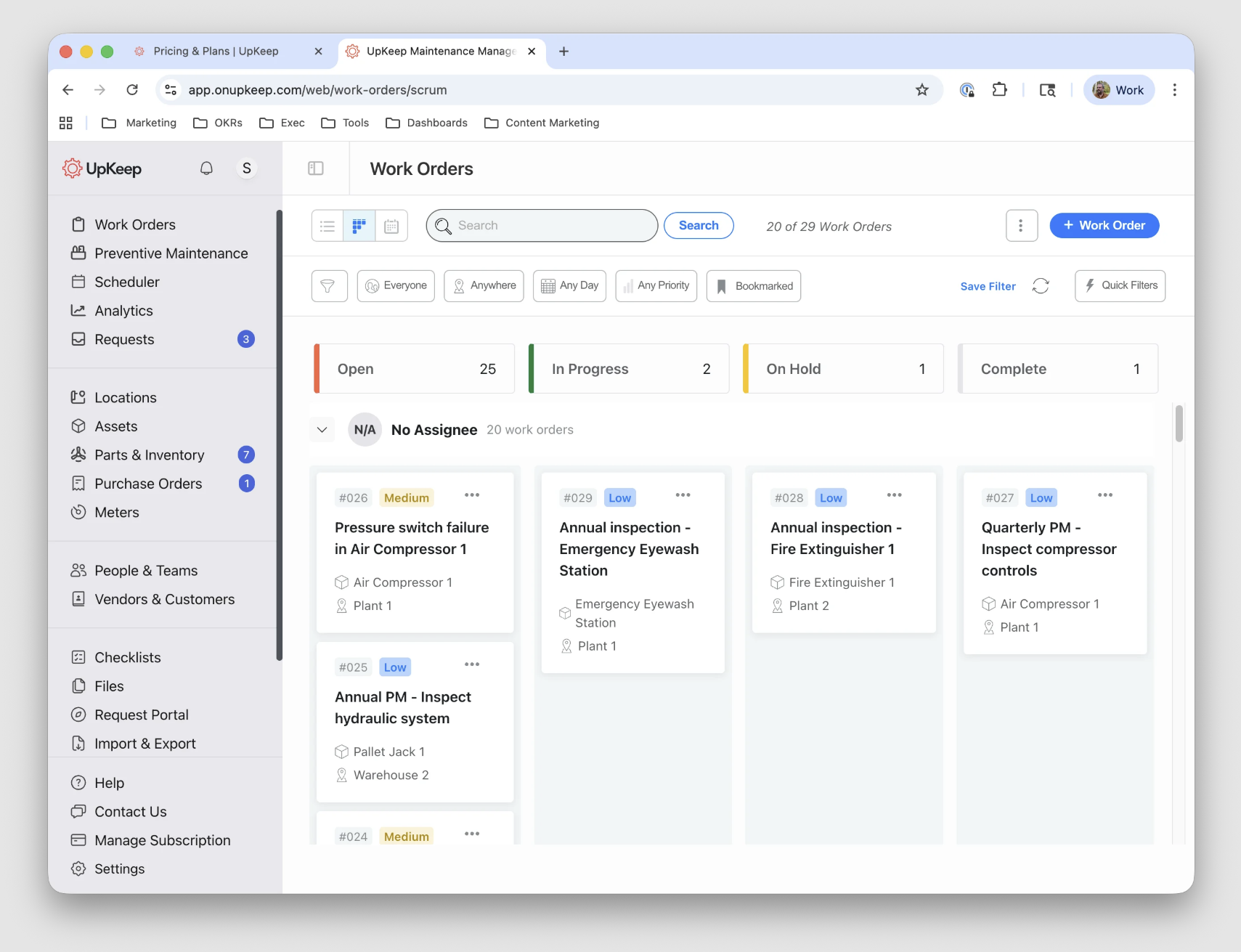
UpKeep is a mobile-first CMMS that has gradually expanded into a broader asset operations platform. Alongside work orders, preventive maintenance, assets, and inventory, UpKeep now offers AI automation through Nova, IoT condition monitoring through Edge, EHS tools, fleet maintenance, and no-code applications through UpKeep Studio.
User sentiment is generally positive, particularly around ease of use, mobile access, and day-to-day work order management. Capterra currently gives UpKeep a 4.6/5 rating (based on 1330 reviews), while its G2 score sits at 4.5/5 (based on 1097 reviews).
Recent reviews frequently praise straightforward implementation, mobile functionality, and visibility into maintenance activity, while recurring complaints include occasional bugs or syncing issues, reporting and customization limitations, and the cost of higher-tier access.
Key features
- Work order management: UpKeep lets you create, assign, prioritize, and track work orders from desktop or mobile devices, with photos, checklists, parts, labor, and asset history attached to the job. Technicians can receive push notifications and update work from the field instead of returning to a desktop computer.
- Preventive maintenance scheduling: You can create recurring preventive maintenance schedules based on time, usage, or other triggers. UpKeep can automatically generate work orders when maintenance becomes due, while its newer AI tools can also recommend scheduling adjustments based on operational data.
- Asset management: UpKeep stores asset records, maintenance history, associated work orders, downtime, documents, and other equipment information in one place. Higher-tier plans add capabilities such as basic asset lifecycle tracking and broader multi-site visibility.
- Parts and inventory management: Maintenance teams can track spare-parts quantities, costs, usage, and availability alongside maintenance work. Technicians can also check inventory from the mobile app, helping them verify that required parts are available before or during a repair.
- Mobile maintenance: UpKeep provides native iOS and Android apps for managing work orders, looking up assets, checking inventory, documenting work, and accessing maintenance information in the field. Offline functionality with automatic syncing is available in high-tier plans.
- Reporting and analytics: Managers can monitor maintenance activity such as backlog, labor, parts usage, downtime, and site performance through dashboards and reports. Reporting depth increases on higher plans, with Professional and Enterprise tiers offering longer analytics history and more advanced reporting options.
- Nova AI and maintenance automation: UpKeep's Nova AI can help generate work orders, search maintenance data, identify patterns, recommend actions, and perform recurring analysis. Premium and higher plans also include embedded AI features such as Smart Scheduler, Voice Fill, automatically generated PM checklists, and Photo-to-Part inventory capture.
Pricing plans
UpKeep offers a tiered per-user pricing model, with published pricing for its first two paid plans and custom pricing for larger organizations. Unlimited requester seats are included, so employees can submit maintenance requests without requiring a full paid license.
- Essential ($24/user/month): Designed for small teams or single-site operations moving away from spreadsheets. It includes unlimited work orders, unlimited locations, and access to Nova AI, but lacks features such as full preventive maintenance scheduling, inventory costing, and advanced analytics.
- Premium ($55/user/month): Adds preventive maintenance scheduling, custom checklists, parts and inventory management with costing, time and labor tracking, 30-day analytics history, and access to UpKeep Studio. This is the first tier that covers most standard CMMS requirements for a growing maintenance department.
- Professional (Custom): Designed for departments managing multiple asset types and needing more field and reporting functionality. It adds mobile offline mode, an external request portal, full analytics history, asset lifecycle tracking, and signature capture.
- Enterprise (Custom): Built for multi-site organizations that need more automation, integrations, and governance. It adds multi-site support, workflow automation, reliability and downtime tracking, purchase order management, API and custom integrations, SSO, custom roles, and custom dashboards.
UpKeep also offers separate implementation, training, IoT sensor, and other add-on services, so the total cost can be higher than the per-user subscription price alone.
What users like about UpKeep
- Ease of use and intuitive interface. [“What I liked most about UpKeep was its intuitive interface and efficiency in streamlining maintenance workflows. It made tracking work orders, managing assets, and improving team communication straightforward and effective.” — Stephanie, Capterra]
- Simple implementation process with high adoption. [“Additionally, the initial setup was straightforward and well-received by everyone, reflecting ease of use that enhances overall adoption.” — Narinder, G2]
- Solid overall mobile experience. [“The seamless mobile application makes it simple for techs to log updates from any site location, which keeps our main dashboard perfectly organized.” — Shyam, Capterra]
What users dislike about UpKeep
- Many features locked behind higher-tier plans. [“Lower tiers have restricted workflows and reporting. We needed the Premium/Professional plan for advanced PM optimization and deeper integrations, which added cost.” — Joseph, Capterra]
- High per-user pricing compared to similar solutions. [“They make large UI changes without warning, their seats are more expensive while having less features compared to other top CMMS softwares, they add features that make this less efficient like the change in work order printing.” — Daniel, G2]
- The mobile app can experience crashes and other issues. [“The mobile app, although generally very helpful, can sometimes be slow and occasionally crashes. This can be frustrating for our technicians who rely on the app for real-time updates and work order management.” — Verified User, G2]
IBM Maximo overview: Key features, use cases, pricing, pros, cons & user reviews
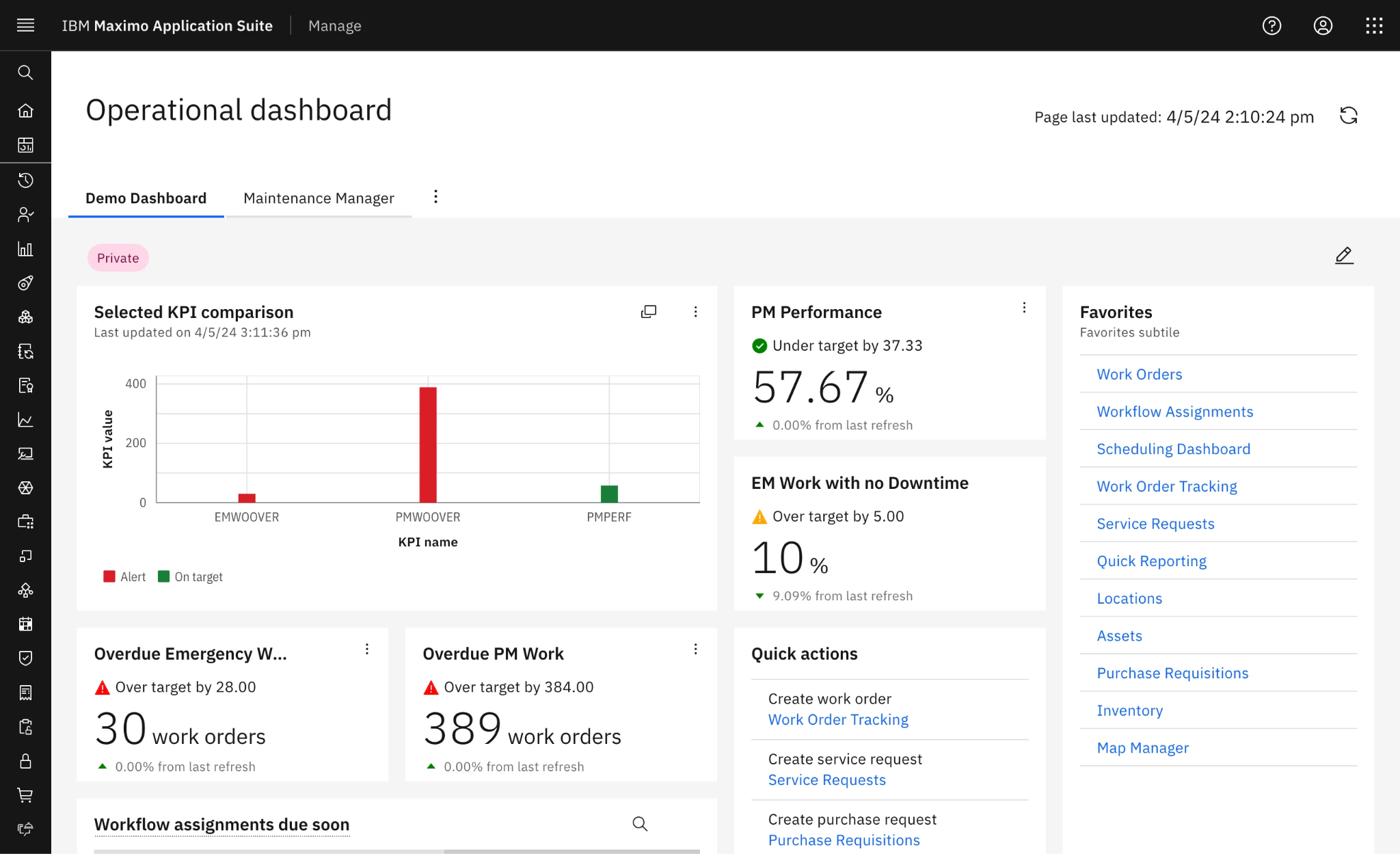
IBM Maximo Application Suite is an enterprise asset management platform built for large, asset-intensive organizations. Its biggest differentiator is depth: Maximo can manage maintenance execution alongside asset health, reliability, predictive maintenance, inventory, inspections, scheduling, and broader asset lifecycle decisions within the same ecosystem.
User sentiment reflects that tradeoff. Maximo currently has a 4.4/5 rating on G2 (from 630+ reviews) and a 4.2/5 rating on Capterra (based on 83 reviews). Customers frequently praise its flexibility, scalability, asset-management depth, and ability to handle complex enterprise processes, while implementation complexity, cost, and ease of use remain major complaints.
Key features
- Enterprise asset and work management: Maximo Manage combines asset records, locations, work orders, maintenance history, labor, materials, inspections, and related processes. Organizations can build detailed asset and location hierarchies and maintain an auditable history throughout an asset's lifecycle.
- Preventive maintenance and scheduling: Maximo supports preventive maintenance programs alongside planning, scheduling, resource allocation, and work execution. Maximo Scheduler adds tools for managing workloads and allocating labor and other resources across complex maintenance environments.
- Asset health and reliability management: Maximo Health combines maintenance, operating, asset, and location data to calculate metrics such as health, criticality, and risk scores. Teams can also analyze failure history, identify recurring problem assets, track reliability metrics such as MTBF, and support repair-versus-replacement decisions.
- Predictive maintenance: Maximo can use historical and near-real-time asset data, maintenance records, inspections, and environmental information to model degradation and potential failures.
- Mobile maintenance: Maximo Mobile provides role-based apps for technicians, supervisors, inspectors, and storeroom personnel on iOS, Android, and Windows. Depending on the workflow, users can execute work orders, conduct inspections, scan barcodes, manage inventory, submit service requests, and work offline.
- Inventory and materials management: Maximo connects MRO inventory directly to maintenance work so teams can track parts, storerooms, usage, availability, reorder points, purchasing, and associated costs. Multi-location inventory and supplier integration also make Maximo suitable for organizations managing complex materials operations across multiple facilities
- Customization and enterprise integration: Maximo is highly configurable and can be connected with ERP, IoT, GIS, and other enterprise platforms using APIs and integration tools.
Pricing plans
IBM does not use a standard per-user pricing model for Maximo. Instead, there is a credit-based licensing system called AppPoints. The number of AppPoints consumed depends on the applications and users being licensed.
- Maintenance SaaS (starting price advertised under $40,000/year): IBM's entry-level maintenance offering includes core Maximo capabilities such as asset management, Maximo Mobile, asset health, reliability strategies, and Scheduler. The entry configuration supports up to 25 users and is intended as a lower-cost starting point for organizations new to Maximo.
- Standard MAS SaaS (Custom): Provides access to the broader Maximo Application Suite, including enterprise asset management, asset performance management, reliability-centered maintenance, predictive capabilities, remote monitoring, and other applications. IBM lists Standard licensing as starting at 300 AppPoints rather than publishing a simple per-user subscription rate.
- Premium MAS SaaS (Custom): Adds greater deployment and operational flexibility for organizations with more demanding requirements. Options can include additional environments, database choices, extended upgrade scheduling, disaster recovery, backups, and longer data-retention requirements.
- Client Managed (Custom): Organizations can license Maximo software and manage the underlying deployment themselves. IBM supports cloud, on-premises, and hybrid deployment scenarios for this option, making it relevant to enterprises with specific infrastructure, security, regulatory, or data-control requirements.
The starting license price does not necessarily represent Maximo's total cost of ownership. Complex setups may also require implementation partners, integrations, migrations, configuration, training, infrastructure, and ongoing Maximo administration. Use IBM's pricing estimator or request a custom quote to get an accurate estimate.
What users like about Maximo
- Enormous flexibility and scalability. [“What I like best about IBM Maximo Application Suite is the breadth of capabilities it brings together in a single platform and the flexibility it offers to support different industries and business processes. As an implementation consultant, I've seen organizations streamline maintenance, inventory, procurement, and reliability activities without relying on multiple disconnected systems.” — Francisco, G2]
- Strong predictive maintenance capabilities. [“One of the biggest advantages for us has been predictive maintenance capabilities. The platform helped us move from a mostly reactive maintenance process to a more proactive approach by identifying potential equipment issues earlier through monitoring and analytics.” — Arkajit, G2]
- Its modular structure. [“The containerized structure is great, allowing additional applications to be installed, and I like how app points can be repurposed for different types of licenses.” — Nelson, G2]
What users dislike about Maximo
- Takes a lot of training to get the most out of the software. [“While IBM Maximo is a powerful tool, one thing I dislike is that the user interface can be complex and not very intuitive, especially for new or occasional users. It often requires multiple clicks to complete basic tasks, and without proper training, navigating between modules can be overwhelming.” — Jeremiah, G2]
- Long and costly implementation process. [“The cost of implementing and maintaining IBM Maximo Application Suite, including the software itself and any associated services, can be substantial. Additionally, the initial implementation and ongoing maintenance and upgrades may require significant resources.” — Bima, Capterra]
- Users report occasional performance issues on both desktop and mobile. [“Maximo has a tendency to freeze. If teams are in a bad signal area it can cause permits to not be updated in time. A lot of the time I need to reset my password. On a small screen, it sometimes looks too much for the teams out in the field.” — Johnny, Capterra]
The verdict: Should you stay with UpKeep or upgrade to IBM Maximo?
So far, we covered what both solutions can do. Now, let’s cover who they are for.
Choose UpKeep if you:
- Work in manufacturing, facilities, property management, hospitality, or food and beverage industries.
- Manage maintenance across small to mid-sized sites or distributed facilities: UpKeep is well-suited to teams that need consistent maintenance processes across locations while keeping the system relatively simple for frontline users.
- Prioritize frontline usability: You want technicians to adopt the CMMS quickly and perform most work from a mobile device.
- Can get by with standard CMMS functionality: Work orders, preventive maintenance, assets, parts, labor, and reporting cover most of your requirements.
- Want a faster SaaS rollout: You would rather configure a cloud CMMS than manage a large enterprise software implementation.
- Have straightforward integrations: You need basic connections with ERP, IoT, GPS, or other business systems without building an extensively customized EAM environment.
Choose IBM Maximo if you:
- Operate in asset-intensive industries such as utilities, energy, transportation, manufacturing, mining, government agencies, or infrastructure.
- Manage a large or complex asset portfolio: You need detailed asset structures, lifecycle management, reliability data, and enterprise-wide maintenance processes.
- Have highly specialized workflows: Your organization needs extensive configuration, integrations, approvals, business rules, or industry-specific processes.
- Operate in an asset-intensive enterprise: Maintenance needs to connect closely with inventory, engineering, operations, reliability, and other enterprise functions.
- Have the resources to support Maximo: Your organization has time, people, and resources to accommodate the implementation, administration, integration, and training requirements.
If you look closely at these recommendations, you’ll notice a sizable gap between these two solutions. If you need something in between that can get you the best of both worlds, you’ll want to take a closer look at enterprise CMMS solutions like Limble.
Limble: UpKeep upgrade without Maximo’s enterprise overhead
Limble occupies the middle ground between UpKeep and IBM Maximo. It provides the approachable, mobile-friendly maintenance experience associated with modern CMMS platforms, while adding the asset structure, cost visibility, reporting, purchasing controls, and enterprise administration that large maintenance organizations often need.
In practical terms, Limble gives you room to grow beyond UpKeep without requiring the level of configuration and infrastructure that comes with Maximo. It’s one of the reasons Thanksgiving Point switched from UpKeep to Limble, rather than Maximo or other EAM software.
Here are key Limble features that help bridge that gap:
- Detailed asset hierarchies: Limble supports multi-level parent-child asset relationships that can be as simple or detailed as your operation requires.
- Mobile-first maintenance execution: Technicians can create and complete work orders, scan QR codes, access asset and parts information, log time, and document maintenance directly from Limble's intuitive CMMS app.
- Cost and asset performance visibility: Teams can track operating costs, downtime, uptime, labor activity, parts costs, and other maintenance metrics. Labor categories can also account for different pay rates and overtime, giving managers more detailed cost data without requiring every analysis to be built outside the CMMS.
- Purchasing and vendor management: Limble goes beyond basic spare-parts tracking with purchase requests, purchase orders, bills, budgets, approval workflows, and vendor records. Enterprise customers can configure purchasing workflows around approval thresholds and budgets, while maintenance teams can associate vendors with parts and compare pricing and lead times.
- Custom reporting without Maximo-level configuration: Managers can build custom dashboards around tasks, assets, technicians, parts, purchase orders, downtime, and operating costs, then export or share the underlying data
- Enterprise-ready integrations, security, and administration: Limble provides API access and webhooks to connect maintenance data with other business systems and supports enterprise identity features such as SSO, RBA, audit logs, and Microsoft Entra ID provisioning. IoT data can also be brought into Limble through supported sensor integrations or its API.
For organizations that have outgrown a straightforward CMMS but do not need the full scope of Maximo, Limble offers a more balanced path: deeper asset and cost management for leadership, without sacrificing usability for technicians and supervisors.
Getting started with Limble is easy
We have an amazing support team that developed a structured onboarding process that covers everything from data import and user settings to technician training, work request creation, and building preventive maintenance schedules.
Small departments are typically up and running within a couple of weeks, while multi-site organizations usually need closer to a month for the full rollout, depending on complexity.
All maintenance management software has its pros and cons. That said, only Limble provides enterprise-grade power that is intuitive enough to use with minimal training and doesn’t break the bank.
Book a demo today to see how Limble would fit your maintenance workflows, or estimate potential costs with our pricing calculator.