
2026 Fiix CMMS Review: The Great, The Good, The Bad & The Ugly
Choosing a CMMS is never about finding the platform with the longest feature list. The real question is whether the software fits your maintenance workflows, asset complexity, technician needs, reporting requirements, and plans for future growth.
Fiix is one of the better-known CMMS platforms in the market, with options ranging from basic maintenance management to more advanced reliability and predictive capabilities. It was acquired by Rockwell Automation in 2020 as part of its broader industrial automation portfolio.
In this Fiix CMMS review, we’ll look at what Fiix actually offers, where it performs well, where users run into problems, and which maintenance teams are most and least likely to get good value from it.
KEY TAKEAWAYS:
- Fiix is a strong fit for midsize and larger asset-intensive teams that need room to scale into condition-based and predictive maintenance workflows.
- Its biggest strengths are core maintenance functionality, industrial integrations, multi-site support, and Rockwell Automation connectivity.
- Fiix users generally praise ease of use, asset and work order management, implementation support, and data management.
- Common complaints revolve around mobile usability, reporting flexibility, slower performance with large data sets, and gating features behind the Enterprise plan.
- Fiix can offer strong long-term value, but advanced features, integrations, and add-ons can push total costs well beyond the base subscription.
What is Fiix CMMS?
Fiix is a cloud-based CMMS that helps maintenance teams manage maintenance work, equipment records, spare parts, and performance data. Technicians and managers can access Fiix through a web browser or mobile app, while larger teams can add capabilities such as multi-site management, integrations, analytics, and predictive maintenance.
Fiix stands out for balancing standard CMMS functionality with advanced industrial capabilities. This makes it a popular solution for midsize and larger asset-intensive organizations that want an approachable CMMS with strong integrations, reliability data, and predictive analytics.
If you already use Rockwell hardware and other plant-floor technology, Fiix should be at the top of your shortlist.
Key features and capabilities you’ll find inside Fiix CMMS
Fiix is designed to support maintenance teams as their processes become more structured and data-driven. You can use it for relatively simple maintenance workflows, then add more control, automation, and connectivity as your team, asset base, or maintenance program grows.
Standard CMMS functionality
Fiix covers all of the core functionalities you would expect from a modern CMMS:
- Work order management: Create, prioritize, assign, and track work orders and maintenance requests. Work orders can include task lists, instructions, parts, files, labor, and other information technicians need to complete the job, while notifications help alert users when new or triggered work is created.
- Preventive maintenance: Set up recurring maintenance based on dates and time intervals, meter readings, or equipment events and alarms.
- Asset management: Build equipment hierarchies and keep asset details, maintenance history, downtime, meter readings, repair costs, and related parts in one place. Fiix also supports QR and barcode scanning and multi-site asset management.
- Maintenance planning and scheduling: Use the maintenance calendar to see scheduled work, assign resources, and track work order status. Fiix also supports resource scheduling and more advanced options such as nested maintenance schedules on eligible plans.
- Parts and inventory management: Track spare parts, stock levels, usage, costs, and where inventory is stored. You can identify low-stock items, perform cycle counts, and share parts information across sites.
- Purchasing and RFQs: Manage vendors, request quotes, create purchase orders, associate purchases with work orders, and maintain purchasing records inside the CMMS. Purchasing workflows can also be connected with ERP systems to keep inventory and financial data synchronized.
- Reporting and analytics: Track maintenance KPIs through dashboards and reports covering areas such as downtime, work orders, maintenance compliance, asset performance, labor, and inventory. Fiix offers more than 100 prebuilt reporting templates as well as custom report-building options on eligible plans.
- Multi-site maintenance management: Coordinate work orders, assets, users, and inventory across multiple facilities from one Fiix environment. Multi-site reporting can roll up maintenance data across locations and help you compare KPIs and standardize maintenance practices between sites.
Fiix mobile app
The Fiix mobile app works on both iPhone and Android devices. You can use it to create and update work orders, view asset information and maintenance history, submit work requests, add photos and files, scan barcodes, record meter readings, complete cycle counts, and use features such as failure codes and e-signatures (if they are enabled for your account).
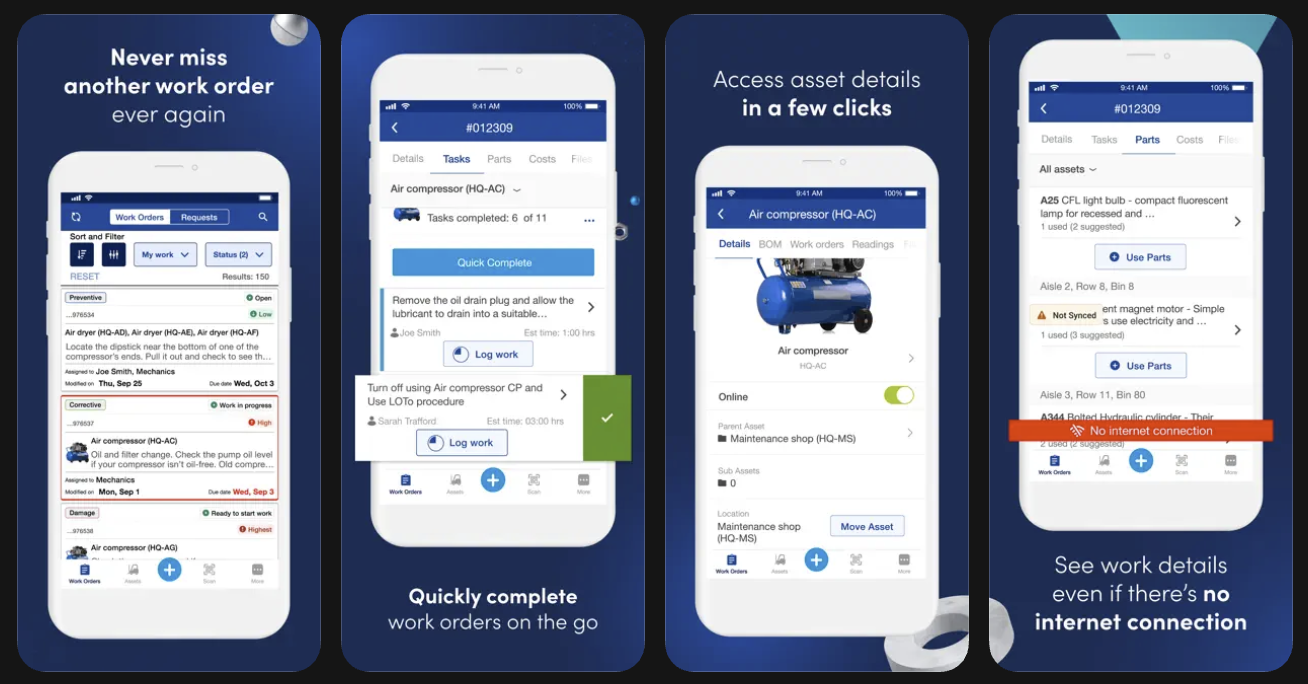
The app supports offline work, with regular syncs every 10 to 15 minutes. Users can trigger a manual refresh, which is important as unsynced changes can be lost if the user logs out before the app reconnects and completes the sync.
The mobile app is one of the weaker parts of the Fiix user experience based on public ratings. As of September 2026, Fiix has a 3.2/5 rating from 324 reviews on Google Play and 2.8/5 from 18 ratings on the US Apple App Store. Recurring complaints include syncing problems, feature differences between mobile and desktop, and occasional performance and stability issues.
Fiix AI and predictive maintenance capabilities
Fiix offers several AI and machine-learning tools that analyze CMMS data, help users find information, forecast maintenance needs, and detect developing equipment problems.
Here’s a quick table that breaks it down:
Most of these capabilities work with data already stored in Fiix and do not require additional hardware. Fiix Asset Health is the exception. It uses Augury wireless condition-monitoring sensors installed on supported equipment, so keep that in mind when evaluating implementation cost.
Fiix integrations and API
Integrations are one of Fiix's stronger differentiators, particularly for manufacturers. The Fiix Integration Hub can connect the CMMS with both business software and operational technology (OT). You can connect systems such as PLCs, HMIs, sensors, MES, DCS, and SCADA, as well as vehicles and other connected equipment.
Fiix provides three main ways to build those connections:
- Pre-built integrations: Fiix's App Exchange provides partner integrations for common systems and industrial equipment.
- Custom integrations: Fiix can build connections for less common systems or more complex deployment requirements.
- Fiix API: Enterprise customers can develop their own integrations using Fiix's API, developer documentation, Java or JavaScript SDKs, and a sandbox environment. The API currently has a limit of 1,000 calls per day for each purchased user license, and Fiix notes that it is not offered as a standard RESTful or SOAP web service.
On the business side, Fiix lists integrations with SAP, Oracle NetSuite, Sage, Microsoft Dynamics, QuickBooks, Power BI, Tableau, Slack, Teams, and others.
Security and user administration
The platform is cloud-hosted on Amazon Web Services (AWS) and is SOC 2 Type 2 compliant. Key security and administration capabilities include data encryption, RBAC permissions, single sign-on, and rolling 30-day backups.
Some of the more advanced administrative controls are tied to higher Fiix plans. Companies with strict IT, security, or compliance requirements should confirm exactly which features are included in their subscription.
Fiix CMMS reviews: What existing users like and dislike about Fiix
Fiix is not among the highest-rated CMMS solutions like Limble or MaintainX, but it does receive generally positive feedback across popular review sites.
Fiix review scores and general sentiment
Below is a quick breakdown of user review scores across major software review platforms and app stores.
Pros of using Fiix based on user reviews
Things users like about Fiix CMMS the most include:
- Gets the basics right. [“I like how it keeps asset information organized, making maintenance operations more efficient and reliable. I find it user-friendly, with ease of use and efficient work order management standing out.” — Archita on G2]
- Easy to navigate and use once the system is configured. [“We use Fiix. It's a great program once you figure out how to use it properly.” — User on Reddit]
- Efficient asset management. [“Easy to use, creating PM's, generating work orders and assigning work orders.” — Mario on Capterra]
- Great integrations, especially with Rockwell products. [“The ease of integration with all Rockwell software products, i.e. Factory Talk. Integration with Logix, Echo, PanelViews…” — User on Gartner Peer Insights]
- Good data management, with strong reliability and predictive analytics. [“One of the key highlights is the historical data record and quick online analysis through reports and analytics. The analytics tools are especially valuable as they have revolutionized the management of maintenance indicators. Additionally, the technology integrated into the system facilitates connectivity with other platforms and ensures high availability.” — Guilherme on G2]
- Excellent implementation and setup support. [“Although we are still in the early stages of setup, we've received incredible support, and everything is progressing very smoothly.” — Deana on G2]
Cons of using Fiix based on user reviews
The most common complaints about Fiix CMMS are:
- Lack of reporting and dashboard customization options. [“Also, having more flexibility to customize dashboards and reports would be beneficial.” — Kumar on G2]
- Building advanced reports takes a lot of expertise. [“The reports and charts are a function where there is opportunity for Fiix to grow. There are some simple charts (like specific assets out of specific locations) that are not present, and it is not easy or intuitive to build these myself.” — Jeff on Capterra]
- Slow performance and loading times with large data sets. [“Some features feel slow at times, especially when loading large lists of work orders or assets. It can make you wait longer than expected.” — Udhay on G2]
- Clunky mobile experience. [“I'd like to see enhancements in the mobile app, particularly in making it faster and more responsive when loading work orders.” — Kumar on G2]
- Limited customization in some workflows. [“I wish there is more flexibility in managing fields in the different screens. While I like the Localization, ability to add custom fields, and to rearrange fields, there are some limited capabilities.” — Mel on Capterra]
- Some tasks and workflows require more manual effort than expected. [“Some features require extra setup or several steps to complete what should be a simple task; …certain workflows could be more intuitive and streamlined.” — Cara on Capterra]
- Subscriptions and contract flexibility. [“I asked to downgrade from a premium subscription to a basic one, and was told that wasn’t allowed. Not “not right now,” not “let’s find a solution,” just a flat no. That’s absurd. Crazy thing is, I wanted to go from two professional seats to five basic seats, which cumulatively is a whole premium seat more than they would receive per month. Wild. — Joshua on G2”]
Fiix CMMS pricing and costs
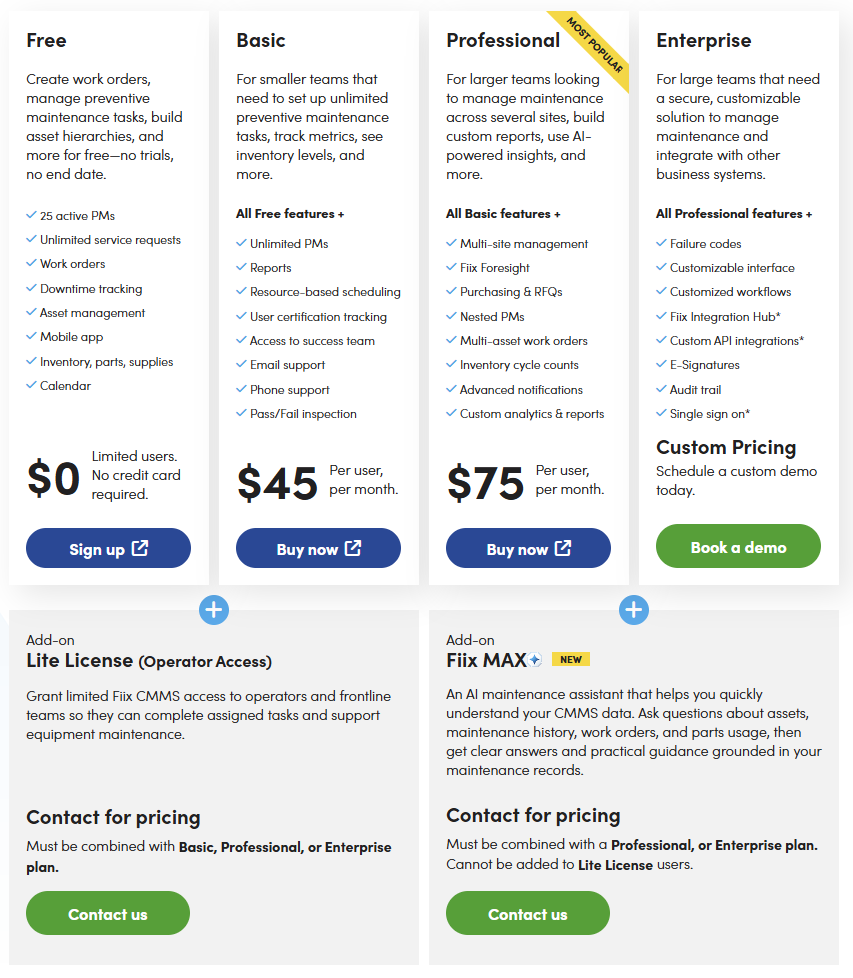
Fiix uses a per-user subscription model and offers a permanent free plan, alongside Basic, Professional, and Enterprise tiers.
The Free plan includes work orders, basic asset management, inventory, the mobile app, downtime tracking, and up to 25 active preventive maintenance schedules. It’s a decent way for a small team to test Fiix with real maintenance workflows before upgrading.
Current Fiix pricing plans
Paid plans start at $45 per user per month, and the capabilities available in different paid tiers are similar to what other top CMMS software providers offer.
Additional Fiix costs to consider
Published per-user prices are only part of the total cost. Depending on your rollout, you may also need to budget for.
- Lite licenses: Fiix offers a separately priced Lite License for operators and frontline workers who only need limited access to assets, assigned work orders, and routine tasks. Lite licenses can be added to Basic, Professional, or Enterprise plans, but Fiix does not publish their price.
- Fiix MAX: Fiix's conversational AI assistant is a paid add-on available with Professional and Enterprise plans.
- Implementation: Fiix sells several implementation packages, ranging from guided self-service for small teams to more hands-on configuration and project management for larger or more complex deployments (this includes support for things like data uploads). Pricing is quoted separately.
- Training: Fiix provides free self-service learning resources, but formal training and enablement services can be purchased separately. Training-only packages are also available for teams that do not need full implementation assistance.
- Premium support: Standard support is included, while Premium Support is a separate annual subscription that adds extended support hours, priority responses, a dedicated customer success manager, refresher training, business reviews, and ongoing access to Fiix experts.
- Integrations: Some Enterprise integrations carry additional charges. Fiix currently lists ERP integrations, custom API integrations, App Exchange access, SSO, and certain custom workflow capabilities as Enterprise features that may require additional payment.
- OT integrations: Connecting Fiix to plant-floor technology such as PLCs, sensors, SCADA, MES, or other operational systems can require additional integration work and services. The actual cost depends on the systems, sites, and integration architecture involved.
- Predictive-maintenance add-ons: Fiix Asset Health is a separate predictive-maintenance offering powered by Augury. Because it introduces wireless sensors, continuous condition monitoring, and additional analytics services, you should treat it as a separate investment rather than something included with the standard Fiix subscription.
You can’t mix Basic, Professional, and Enterprise plans within the same CMMS account. Upgrading the plan changes the tier for the entire account, although Lite licenses give you an option for users who do not need the standard license.
When to go for Fiix vs. look for alternatives
Fiix can be a strong fit for some maintenance environments, but the decision depends heavily on your operational complexity, technology stack, and how you expect the CMMS to support your team over time.
Consider Fiix if you run large single-site or multi-site industrial facilities that want good standard CMMS functionality and strong reliability analytics. It is a particularly strong fit for manufacturers that value industrial integrations, are in the Rockwell Automation ecosystem, and want a clear path toward predictive maintenance.
Consider Fiix alternatives if your priorities are fast and simple implementation or a strong mobile-first experience. Alternatives may also be a better fit if you require full EAM capabilities, have highly specialized workflows, manage commercial facilities with a lot of contractors, or need on-premise deployment.
If Fiix does not line up with your priorities, the next step is to compare it with alternatives that approach the same maintenance problems differently. One of the best options is Limble, especially for teams that place a high value on functionality, technician adoption, mobile experience, and customer support.
Why companies choose Limble over Fiix
Fiix and Limble overlap heavily in their core CMMS functionality. The main differences lie in day-to-day user experience, mobile usability, and customer support.
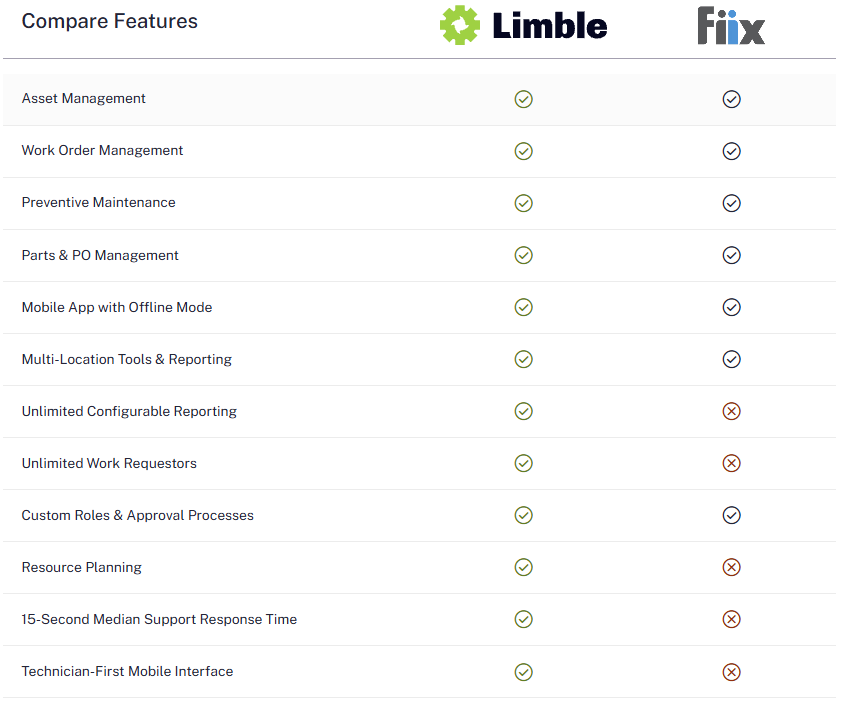
Here’s what this translates to in practice:
- On average, Limble is quicker to implement and takes less admin time to maintain.
- Limble offers a stronger mobile app: easier to learn and use, fewer sync issues, and better technician adoption.
- Fiix offers excellent support — if you are willing to pay for it. Limble gives all customers premium support, with 24/7 access via chat, email, or phone in every time zone. Our team responds to inquiries in seconds, and support issues are resolved in under 30-minutes on average.
- Fiix pushed you to its Enterprise plan to access its API, condition-based triggers, and e-signatures. Limble has all of that available in its Premium+ plan.
Lastly, if you were looking into Fiix because of condition monitoring, know that Limble offers modular, plug-and-play IoT sensor deployments and integrates with PdM platforms like AssetWatch, AVEVA, Augury, and VibeCloud. Companies that plan to run condition-based or predictive maintenance have that path wide open for them.
Limble is not a better solution for every use case, but it does offer greater value for money in many scenarios.
See how Limble compares for your operations by booking a personalized demo.
FAQs
Is Fiix a CMMS or EAM?
Fiix is primarily a CMMS. It does offer broader asset management, multi-site, integration, and enterprise administration capabilities, but organizations that need full asset lifecycle, capital planning, or complex financial asset management should go with a proper enterprise asset management platform.
Is Fiix good for small businesses?
Fiix's free plan can be a solid option for small businesses that want to start with basic maintenance management and scale later. However, Fiix does focus more on mid-market and large organizations.
Can Fiix manage vendors and purchasing?
Fiix can store vendor records and documents, designate preferred suppliers, send RFQs and purchase orders, associate purchases with work orders, track receipts, and connect purchasing data with ERP systems through integrations.
If by vendors you mean outside service contractors, Fiix does cover the basics: you can share work orders with them, track progress, and keep vendor records.
How much can Fiix be customized?
Fiix offers substantial customization on higher plans. Depending on your subscription, you can configure work order forms and asset profiles, add some custom fields, modify lookup tables, build custom reports and dashboards, customize workflows to a degree, and adjust interface elements to better match your maintenance processes.
How long does Fiix take to implement?
Fiix implementation can take from a few weeks to several months. It depends on your number of users, assets, sites, integrations, and how much data needs to be migrated. Compared to other leading enterprise CMMS solutions, Fiix implementation time sits somewhere in the middle — it is not as quick as Limble, MaintainX, or UpKeep, but it is generally faster than the likes of eMaint or Maintenance Connection.