
Maintenance Connection vs IBM Maximo in 2026: In-depth Comparison
Both Maintenance Connection and IBM Maximo are mature platforms with decades-long history and a deep ecosystem. Both are used in regulated environments. Both offer cloud and on-premises deployment.
And while there are plenty of similarities that put these two in the same conversation, there are just as many differences.
IBM Maximo is a heavy, enterprise-grade asset management suite built for massive infrastructure and complex global operations, whereas Accruent Maintenance Connection is a more streamlined, user-friendly CMMS focused on multi-site facility and routine maintenance management.
To help you make an informed apples-to-apples comparison, this guide breaks down the key differences between Maintenance Connection and Maximo, then looks at each platform in more detail: features, pricing, and what real users like and dislike about each software.
By the end, you'll know which solution fits your operation better and when a third option — like Limble — makes more sense.
Maintenance Connection vs IBM Maximo at a glance
On core maintenance, Maintenance Connection and Maximo overlap almost completely: work orders, preventive maintenance, asset tracking, inventory, and compliance documentation are table stakes for both.
What separates them is everything that sits around maintenance — predictive applications, enterprise integrations, asset investment planning — and what it takes to learn and run each platform day to day.
Key differences between Maintenance Connection and IBM Maximo
Here’s a quick overview of the biggest differences between Maintenance Connection and Maximo:
- Linear asset management: Maximo uses linear referencing (for pipelines, rail, roads, transmission lines…), so work can be logged at a measured point and each segment tracked separately. Maintenance Connection maps distributed assets through its Esri ArcGIS integration. If your critical assets are counted in kilometers rather than units, this difference alone may decide the comparison in Maximo’s favor.
- Implementation timeline and complexity: Maintenance Connection installs as conventional software — configuration and training take real effort, but can be done in a reasonable timeframe. Maximo containerized infrastructure often requires lots of configuration and integration work, staged rollouts across modules, and help from certified partners. So it ends up taking more time, money, and expertise to complete.
- Total cost of ownership: Simply put, Maintenance Connection is way cheaper to implement and requires significantly less effort to maintain. You can’t run Maximo without a dedicated IT team on hand.
- Module depth vs suite breadth: Maintenance Connection goes deep in a narrow lane — work orders, PMs, assets, inventory, and extensive reporting, all in service of maintenance. Maximo covers similar depth for maintenance management, but also offers predictive analytics, capital planning, asset performance management, and other EAM features.
Side note: Maintenance Connection is one of several platforms in Accruent’s ecosystem, which also offers solutions like EMS (Workplace and event scheduling), Lucernex (Real estate and lease management), Observe (IoT monitoring and energy management), etc. Combining some of those can fill potential gaps and get you closer to Maximo’s level of functionality. However, this does come with its own set of problems — cost, complexity, and different interfaces, workflows, and support experiences.
Maintenance Connection overview: Key features, use cases, pricing, pros, cons & user reviews
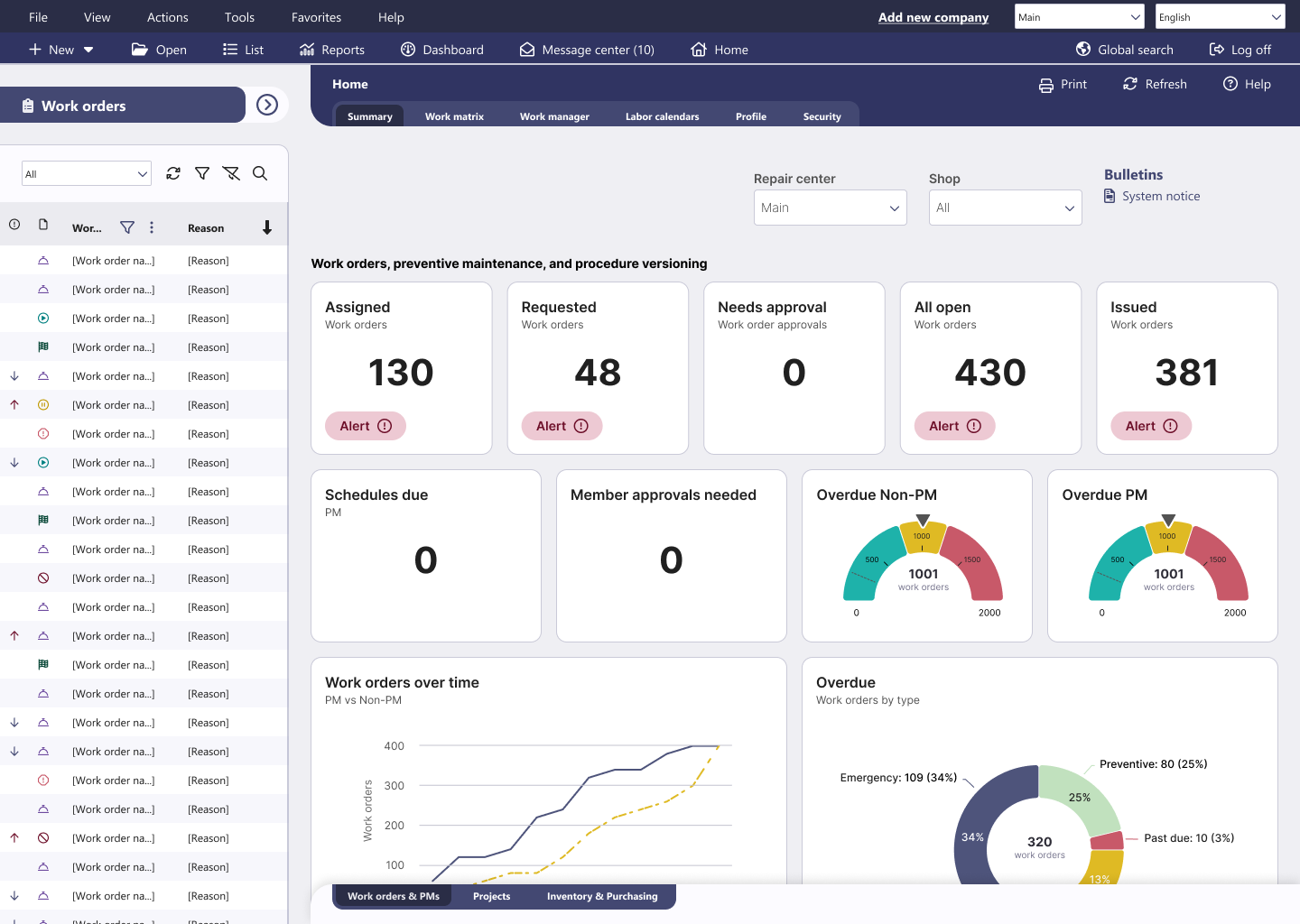
Maintenance Connection is a multi-site CMMS and EAM platform built for maintenance teams in healthcare, higher education, manufacturing, and utilities — environments where audit-readiness matters as much as uptime. It offers everything teams need for effective maintenance and facility management.
Maintenance Connection holds a 4.4/5 rating on Capterra (443 reviews) and on G2 (73 reviews). Reviewers most often praise its functional depth, customization, and reliable work order and PM tracking. The most common complaints center on the learning curve, a somewhat dated interface, and reporting that can be tricky to run.
Key features
- Compliance and inspections: Maintenance Connection's standout in regulated industries — secure e-signatures, precise procedure versioning, robust audit trails, and centralized documentation, with capabilities built to meet FDA 21 CFR Part 11 and ISO standards.
- Work orders & preventive maintenance: Centralized work order creation, review, and assignment, with automated notifications keeping teams on schedule without manual chasing. You can also automate recurring maintenance schedules using time, usage, and condition triggers.
- Inventory and spare parts tracking: Monitor stock levels, handle parts checkouts, manage warehouse transfers, and set automated reorder points to generate purchase requests.
- Mobile CMMS: A mobile-first app (available as a paid add-on) with offline capabilities and barcode and QR code scanning, so technicians can update work orders, check stock, and track meters from the field — no separate suite of role-based apps to configure, unlike Maximo Mobile.
- Reporting and dashboards: Configurable dashboards and reports for metrics like completion rates and labor costs, plus Accruent Data Connect for BI-ready datasets you can pipe into your own analytics tools.
- Integrations: A pre-built integration hub for ArcGIS, ERP, SCADA, HR, EDMS, and IoT systems, with an open API for custom work. Narrower than Maximo's enterprise integration framework, but usually requires less configuration effort to get connected.
Pricing plans
Maintenance Connection uses named-user subscription pricing where every license includes unlimited work orders, PM scheduling, inventory management, and EAM-level reporting. Users can choose between three pricing plans:
- Professional ($110/user/month): For teams of three or more users, with single-site to multi-site scalability, simplified integrations, full audit trail and document management, and automated notifications.
- Mobile Add-on ($58/user/month): An add-on for Professional or Enterprise licenses that brings barcode and QR scanning, document access, images and e-signatures, and mobile parts and inventory management to the field.
- Enterprise (custom quote): For a minimum of five users, adding multi-site capabilities, powerful reporting and dashboards, inventory, financial, and purchasing tools, scalable infrastructure, and native EDMS and IoT integration.
Two important notes: Every plan requires a minimum one-year contract, and you’ll need to contact Acruent for a personalized quote since final pricing depends on your exact configuration.
What users like about Maintenance Connection
- Configuration flexibility admins can handle in-house, without vendor tickets. [“The flexibility for Maintenance Connection to adapt to our unique business needs has been outstanding. We needed a product we could customize in-house, and MC was an open book compared to other CMMS software.” — Douglas, G2]
- Depth of the all-in-one module set for the price. [“Maintenance Connection has proven to be a great value for the cost, providing a secure site with tons of operational tools and solid customer service. I find the document and asset management very useful — building BOMs for equipment, attaching technical data and images, all of which can be linked to work orders.” — Paul, Capterra]
- Asset history and record-keeping built for compliance and audits. [“Management of the assets is the biggest win with a paper trail for audit reasons and showing customers documentation.” — Kittra, Capterra]
- Onboarding and training that get new admins productive fast. [“The available training resources make it easier for new users to get up and running efficiently. Although I have only been using the system for two weeks, I have already been able to configure new technicians, assign user access, set up new assets, and create work orders with confidence.” — Patrick, Capterra]
What users dislike about Maintenance Connection
- Custom reporting that's powerful but cluttered and hard to build. [“The platform needs an overhaul… Creating reports and the tracking needs major work. Too many options that create confusion and extra work even after you export.” — Shayla, Capterra]
- A dated, click-heavy interface with constant refreshes and saves. [“I have to refresh it every 5 minutes. I also need to open a new tab to work separately on the WO. On top of that, every small detail has to be saved before I can move ahead.” — Dhruv, G2]
- A clunky mobile app. [“The MC Kinetic app seems to be lacking and has bugs often. The search function does not work dependably, and the Inventory count function was requested 2 years ago but has not been added.” — Keith, G2]
- Inconsistent support. [“As a seasoned user, there's not a lot of options for me to customize what I need. We have used the system for 5 years and I'm still not getting what I need from the program and I don't have the support to assist.” — Skyler, Capterra]
IBM Maximo overview: Key features, use cases, pricing, pros, cons & user reviews
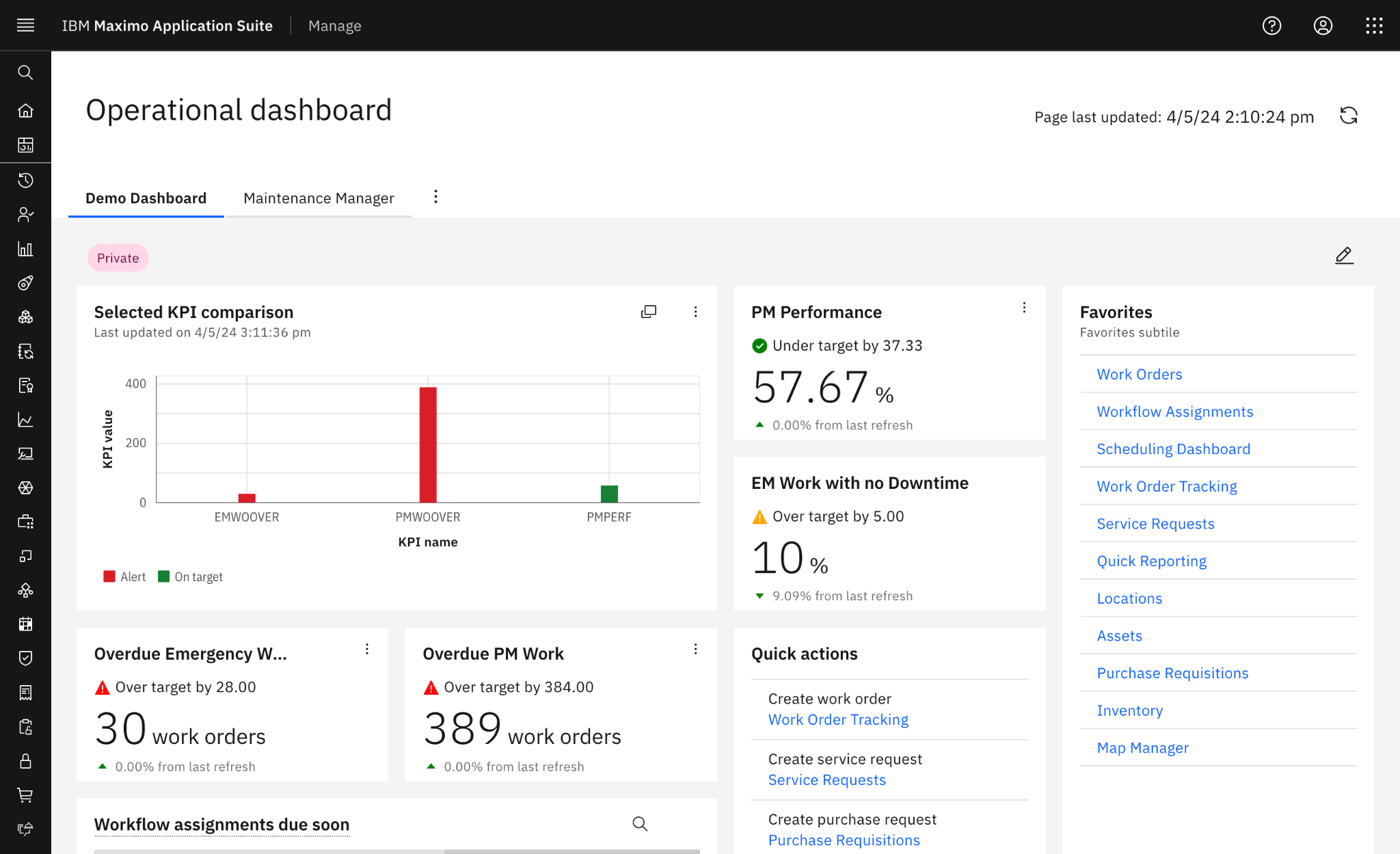
IBM Maximo Application Suite (MAS) is an enterprise asset management platform for asset-intensive, heavily regulated industries like utilities, oil and gas, transportation, and manufacturing. Compared to Maintenance Connection, the roles are reversed: maintenance management is not the focus, just one application in Maximo's broader suite.
IBM Maximo holds a 4.4/5 rating on G2 (631 reviews) and a 4.2/5 rating on Capterra (83 reviews). Reviewers most often praise its deep asset management, configurability across industries, and organization-wide scalability. The most common complaints are the steep learning curve, complex and lengthy implementations, and the cost of licensing and infrastructure.
Key features
- Enterprise asset management: Maximo manages the full asset lifecycle — hierarchies, history, condition, costs, and criticality — at the scale of hundreds of thousands of assets. This includes strong support for linear assets like pipelines, railway tracks, roads, and transmission lines.
- Inventory & supply chain management: Optimizes stock levels, manages tool rooms, handles material procurement requisitions, and tracks parts usage to lower carrying costs.
- Work orders and preventive maintenance: Plan, schedule, assign, and document maintenance with enterprise depth — multi-asset work orders, job plans, failure codes, classifications, and configurable approval routing for standardizing workflows at scale. Trigger PMs based on time, meter readings, asset condition, and other events.
- Asset monitoring and predictive maintenance: The Health, Monitor, and Predict applications pull operational, IoT, inspection, and maintenance data into a single asset health score, flag anomalies, and predict likely failures.
- Compliance and governance: Security and data governance are embedded across the suite, with configurable inspection forms, structured approval routing, role-based permissions, and full auditability.
- Integrations and enterprise ecosystem: Maximo connects maintenance to ERP, finance, procurement, GIS, IoT, and other operational systems via APIs and its integration framework.
Pricing plans
IBM's pricing estimator helps with planning, but the figures it produces are just broad estimates. There are three pricing packages:
- Essentials: The entry point for organizations new to Maximo, covering select enterprise asset management and mobility capabilities, with Asset Management, Mobile EAM, Asset Health, and reliability-centered maintenance included.
- Standard: Unlocks the full Maximo portfolio — predictive maintenance, remote monitoring, visual inspection, industry solutions, and enterprise integrations (ERP, HCM, SCM).
- Premium: A fully custom configuration for highly complex deployments with IBM's premium services. Pricing is bespoke.
As with all enterprise maintenance solutions, to find out the exact costs, you’ll need to reach out to IBM to get a personalized quote based on your operational needs and configuration requirements.
What users like about IBM Maximo
- Powerful, deep asset management built for large, complex operations. [“The depth of asset management it delivers right out of the box. The hierarchical asset structure, work order management, and PM scheduling feel mature, and they handle complex industrial environments that lighter CMMS tools simply can't.” — Ramzi, G2]
- High configurability to fit almost any industry or process. [“What I like best is the breadth of capabilities it brings together in a single platform and the flexibility it offers to support different industries and business processes.” — Francisco, G2]
- Strong automation capabilities. [“I like the ability to automate maintenance and asset management in IBM Maximo Application Suite… Creating work orders automatically is a significant feature for me.” — Dinesh, G2]
- Scale across an entire enterprise, backed by modular architecture. [“I appreciate the flexibility and scalability of the IBM Maximo Application Suite. Its containerized architecture is a standout feature, as it allows the software to scale seamlessly across an entire organization.” — Khushivant, G2]
What users dislike about IBM Maximo
- A steep learning curve driven by the sheer number of features. [“Maximo is powerful, but the learning curve is definitely high. New users may find the interface overwhelming at first because there are so many modules and configuration options.” — Verified User in Computer Software, G2]
- Complex, lengthy implementations. [“The overall complexity of implementation and customization. The platform is extremely feature-rich, but that also means onboarding can take significant time and planning, especially for organizations with large or highly customized operational environments.” — Arkajit, G2]
- An unintuitive, click-heavy interface for everyday tasks. [“The user interface can be complex and not very intuitive, especially for new or occasional users. It often requires multiple clicks to complete basic tasks.” — Jeremiah, G2]
- High total cost of ownership. [“Like most IBM products, it is bit expensive.” — Verified Reviewer, Capterra]
The verdict: When to opt for Maintenance Connection vs Maximo?
The right pick is less about which is "better" and more about the capabilities you need. Maximo has more features and better customization, but most organizations are not at a scale where they necessarily benefit from that (or like the price tag).
Choose Maintenance Connection if:
- You're a mid-market maintenance team that wants core CMMS depth with solid audit and compliance capabilities for regulated industries.
- You value a rollout measured in months rather than quarters or years.
- You want your admin to be able to configure the system without constantly filing vendor tickets.
- You have a more limited budget and prefer predictable, per-user pricing.
- You are fine with the trade-offs like a dated interface, reporting that takes some learning, a weaker mobile app that's also priced as an add-on, and support that won’t always be quick to answer.
Choose IBM Maximo if:
- You're running a large or complex asset base across many sites and need genuine EAM breadth — linear assets, IoT-driven monitoring and prediction, and deep ERP integration.
- You’re ok with a long implementation timeline and learning curve as you plan to use many of the powerful capabilities Maximo offers.
- You have the budget to cover dedicated Maximo specialists or consultants, as well as custom configurations and integrations.
To get depth, both options make you swallow complexity in some form. Maintenance Connection's own reviewers call it cumbersome to navigate; Maximo's call it overwhelming. Either way, the people who actually close work orders inherit a steep learning curve. If you want enterprise-grade asset management without that tax, Limble might just have what you need.
Limble: A better alternative to Maintenance Connection and IBM Maximo
Limble is a modern maintenance solution built around a simple idea: give teams powerful features, but make sure the platform remains easy to use.
You get enterprise depth for maintenance and reliability managers, with an intuitive mobile app for frontline teams:
- Live in weeks, not quarters: Enterprise CMMS implementations often stretch 6 to 12 months. Backed by a structured onboarding process and 24/7 hands-on support, even multi-site organizations can set up Limble in just a month or two.
- A mobile app that comes standard: Offline mode, mapping, and QR code scanning are included — not a $58/user/month add-on like Maintenance Connection's mobile offering. Technicians can search assets by name, ID, or QR code and jump straight into work orders without digging through menus.
- Reports anyone can build: Both platforms draw complaints about reporting that takes real learning. Limble pairs pre-built CMMS reports and dashboards with an intuitive widget builder for dynamic reports and custom metrics.
- Modular predictive maintenance: Plug-and-play condition monitoring with real-time data on asset condition and failure modes, through integrations with AssetWatch, Augury, Aveva, Monnit, Samsara, and more. That's built-in predictive capability, without Maximo's suite-sized price of entry or a partner stack to assemble.
- Practical AI in everyday workflows: PM builder, scheduling optimization tips, MCP server, resource forecasting, anomaly detection, and more — seamlessly built in to make everyday work faster and smarter.
- Audit-ready compliance: Standardized processes, documentation, and maintenance records that stay current because technicians actually use the app they're logging work in.
See how Spectrum Solutions, a medical device manufacturer from Utah, utilized Limble to simplify FDA audits and digitize their maintenance operations:
Maintenance teams shouldn't have to choose between software their technicians tolerate and software they'll never fully learn. Limble delivers the depth this comparison is really about — assets, PMs, compliance, predictive insights — on a platform people pick up in days.
Book a demo today to learn more, or estimate potential costs with our online pricing calculator.