
eMaint vs UpKeep: A Head-to-Head Comparison for Maintenance Leaders
When your maintenance team outgrows spreadsheets and paper checklists, the most sensible solution is to look for a capable CMMS. Some teams evaluating CMMS software will end up with UpKeep and eMaint on their shortlist — which is a decision between power and customization or simplicity and speed.
On one side is eMaint (by Fluke Reliability), a highly customizable, robust CMMS built for industrial environments and condition monitoring. But that power comes with complexity. eMaint’s interface feels dated, takes a long time to configure, and it can be difficult for frontline teams to use efficiently.
On the other side is UpKeep, a mobile-first CMMS that prioritizes ease of use and fast adoption. It simplifies communication and daily workflows, but its asset management depth, reporting, and predictive maintenance capabilities often fall short for more advanced operations.
To help you make the right decision, this guide breaks down the key differences between eMaint and UpKeep. You’ll see how they compare across features, pricing, ideal use cases, and user sentiment. At the end, we will introduce a third option that excels in areas where these two products falter.
eMaint vs UpKeep: Key differences
Both eMaint and UpKeep are CMMS platforms designed to help you centralize maintenance operations, track work orders, and improve team communication. They each support core functionality like preventive maintenance scheduling, asset tracking, and reporting.
That said, both platforms have limitations. eMaint can feel overly complex and difficult to adopt, especially for frontline technicians, while UpKeep often lacks the depth needed for advanced asset management and scalability. In different ways, both tools can create friction — either through usability challenges or functional gaps.
Now, let’s take a closer look at the key differences between eMaint and UpKeep:
- Customization vs. speed: eMaint is highly customizable, allowing you to build tailored dashboards, workflows, and reports — but navigating its modules often requires technical expertise and comes with a learning curve. UpKeep offers a more rigid but intuitive interface that most teams can set up and adopt quickly with minimal training.
- Condition monitoring: eMaint integrates with Fluke’s ecosystem of sensors and testing tools, making it a strong choice for condition-based and predictive maintenance. UpKeep handles calendar-based preventive maintenance well but lacks the same native hardware integrations.
- Frontline mobile experience: UpKeep is built around a fast, mobile-first experience that technicians can use easily in the field. eMaint offers mobile access, but its interface is less modern and often requires more steps to complete simple tasks like closing a work order.
- Scalability and complexity: eMaint is better suited for large, asset-intensive organizations with complex requirements. UpKeep works well for smaller teams, but its simplicity can become a constraint as operations grow.
Implementation approach: eMaint typically involves a more structured onboarding and configuration process, while UpKeep is designed for quick setup and faster time to value.
eMaint: Key features, use cases, pricing, pros, cons & user reviews
eMaint is a highly customizable CMMS built for organizations that need deep control over asset performance, workflows, and maintenance strategy. It stands out for its advanced configuration options, strong reporting engine, and native integration with Fluke’s condition monitoring tools.
eMaint is designed for complex, asset-intensive environments — but that power often comes with a steeper learning curve and longer implementation time.
Key features
- Work order management: Create highly configurable workflows, automate task assignments, and manage complex maintenance processes.
- Preventive and predictive maintenance: Support for time-based, usage-based, and condition-based maintenance with IoT and sensor integrations.
- Asset management and hierarchy tracking: Build complex asset hierarchies, track lifecycle data, and manage criticality and risk.
- Inventory and MRO management: Track spare parts, manage suppliers, and optimize inventory levels across locations.
- Condition monitoring integrations: Connect with Fluke sensors and vibration analysis tools for real-time equipment insights.
- Integrations: Connect eMaint to sensors, SCADA, PLC, BMS systems, Power BI, ERPs, CRMs, and many other business applications using native integrations or eMaint API.
- Custom dashboards and reporting: Create tailored dashboards and run in-depth reports on maintenance KPIs, costs, and performance.
Ideal users
eMaint is best suited for organizations that need advanced customization and deep asset insights. Common use cases include:
- Enterprise and industrial organizations with complex asset portfolios.
- Manufacturing and heavy industry teams focused on reliability and uptime.
- Organizations already using Fluke monitoring tools or sensors that want to expand their condition-based and predictive maintenance programs.
- Companies that want highly configurable workflows and dashboards, and do not mind the complexity that comes with that.
Strengths
The three most common advantages of using eMaint based on user reviews:
- Highly customizable workflows and reporting. [“I like the customization of the fields, workflows, and ability to self generate reports.” — Jason, G2]
- Strong parts inventory management. [“The inventory management feature is very useful, along with the ability to generate purchase orders. I also appreciate the capability to cycle count and auto-generate purchase orders with email notifications.” — Ethan, G2]
- Responsive customer support. [“The team has been outstanding in supporting any requests and issues we have, addressing them promptly and efficiently.” — Philip, Capterra]
Limitations
The three most common limitations of using eMaint based on user reviews:
- Steep learning curve, especially for frontline teams. [“Although beneficial as a whole, there is a learning curve when it comes to working around the system that takes time for maintenance staff to adjust to.” — Verified User, G2]
- Customization and reporting setup require technical expertise. [“There is a learning curve to a software system especially switching from X4 to X5. A lot of the programmable options like custom expression require some background in coding or logic.” — James, Capterra]
- The mobile app had a lot of room for improvement. [“The one thing I do not like about this system is the mobile app for my technicians. There are too few search options and the scrolling through work orders can be very tiresome. Most of my 14 techs end up printing out their work orders…” — Joe, Capterra]
Pricing plans
The eMaint pricing is split into the following tiers:
- Team (~$69/user/month): Includes all of the basic CMMS functionality for smaller teams.
- Professional (~$85/user/month): Adds interactive dashboards, custom workflows, mobile app, enhanced reporting, and some multi-site capabilities.
- Enterprise (custom quote): Unlocks additional multi-site capabilities, custom and API integrations, and predictive maintenance tools.
Implementation support and on-site training can be purchased as additional add-ons across all pricing plans.
Overall user sentiment
At the time of writing, eMaint has a broadly positive user sentiment on big review sites, with a 4.5 score on G2 (based on 266 reviews) and a 4.5 score on Capterra (based on 383 reviews). It’s a solid score, but lagging behind industry leaders like Limble and MaintainX.
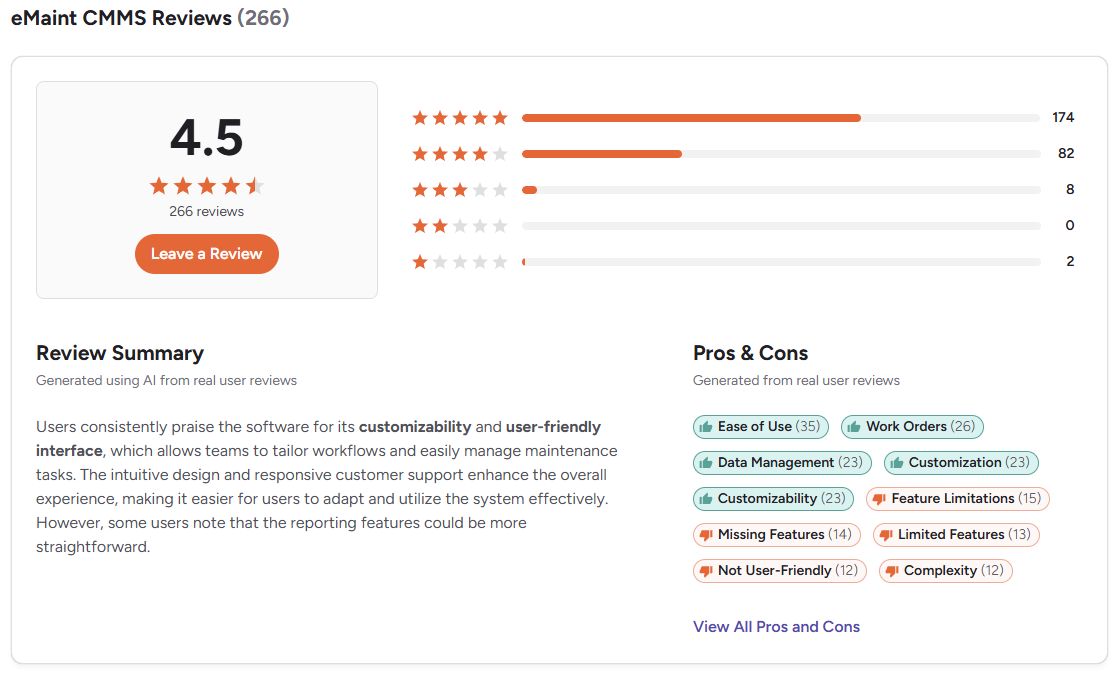
The high level of customization offered in eMaint does come at the cost of greater complexity, steeper learning curves, and a lengthy setup. It seems that the vendor is aware of that, as several users mention how customer support helped them set up reports and resolve various technical challenges.
UpKeep: Key features, use cases, pricing, pros, cons & user reviews
UpKeep is a mobile-first CMMS designed to simplify maintenance operations and improve communication between teams. It stands out for its intuitive interface, fast onboarding, and strong adoption among frontline technicians.
Unlike some enterprise-focused CMMS platforms, UpKeep prioritizes ease of use and speed, making it a popular choice for teams moving away from spreadsheets. However, its simplicity can limit how far you can scale and customize the platform.
Key features
- Mobile-first work order management: Create, assign, and complete work orders directly from a smartphone, with real-time updates and notifications.
- Maintenance scheduling: Automate recurring maintenance tasks based on time, usage, or meter readings. Connect UpKeep to IoT sensors to run condition-based maintenance.
- Asset management: Track equipment details, maintenance history, and associated costs in a centralized system.
- Inventory management: Monitor spare parts, set minimum stock levels, and receive alerts for low inventory.
- In-app communication: Use comments, mentions, and notifications to keep technicians and managers aligned.
- Reporting and analytics: Generate basic reports on work orders, costs, asset performance, and maintenance trends.
- Integrations and API access: Connect with tools like QuickBooks, Zapier, and other business systems. API access is available only on the enterprise plan.
- AI capabilities: Smart Scheduler that optimizes PM timing, generative AI for building inventory items based on photos and checklists based on manuals, work order summaries, voice fill, and more.
Ideal users
UpKeep is best suited for teams that prioritize ease of use and fast deployment over deep customization or advanced asset analytics.
- Small to mid-sized maintenance teams transitioning from paper-based or spreadsheet-based processes.
- Facilities management teams that need better communication and task tracking.
- Field service teams that rely heavily on mobile devices.
- Light manufacturing operations that prioritize fast technician adoption over complex reliability engineering.
- Organizations with straightforward maintenance workflows and a limited need for complex configurations.
Strengths
Three biggest advantages of using UpKeep based on user reviews:
- Most teams can get started with minimal training. [“Very intuitive. From the get-go, it's very easy to navigate. My first day of training, I was basically a pro after about an hour.” — Ben, G2]
- The mobile app is (most of the time) fast, intuitive, and widely praised by technicians. [“The mobile app has been extremely handy to use.” — Derek, G2]
- The implementation and setup are fairly straightforward compared to eMaint. [“Very easy to set up and get going, very easy to populated data, and very useful to schedule work orders, etc.” — Lindsey, Capterra]
Limitations
The three most common limitations of using UpKeept based on user reviews:
- Workflows, dashboards, and reports are relatively rigid compared to a system like eMaint. [“Although the UpKeep platform was easy to use, I found that some features were a bit limited. For example, I would have liked to have the ability to customize some of the report templates more to better fit my company's specific needs.” — Verified Reviewer, Capterra]
- Lacks depth for complex asset hierarchies and lifecycle tracking. [“Developing an asset hierarchy/equipment tree can be cumbersome. When creating a hierarchy, I would like to be able to put my assets in an order that makes sense to me. It is difficult to do this with UpKeep unless you use some trick such as inserting a letter or character in front of the asset.” — James, Capterra]
- Limited number of hardware integrations available. [“I’d really like to see integrated modules that cover all of our internal coordination, and I also wish there were more native integrations available.” — Husein, G2]
Pricing plans
UpKeep uses a classic tiered SaaS pricing model:
- Essential (~$20/user/month): Basic work order management for small teams operating a single site.
- Premium(~$55/user/month): Adds PM scheduling, custom checklists, time and labor tracking, 30-day analytics, and basic parts inventory management.
- Professional (custom quote): Adds mobile offline mode, advanced reporting, full analytics history, and signature capture.
- Enterprise (custom quote): Includes API access, workflow automation, custom dashboards, and multi-site capabilities.
On top of that, there are add-ons for EHS management, fleet management, and condition monitoring (UpKeep Edge).
Overall user sentiment
UpKeep is one of the most reviewed CMMS solutions on the market. It has a similar user sentiment as eMaint, with a 4.5 score on G2 (based on 1091 reviews) and a 4.6 score on Capterra (based on 1320 reviews).
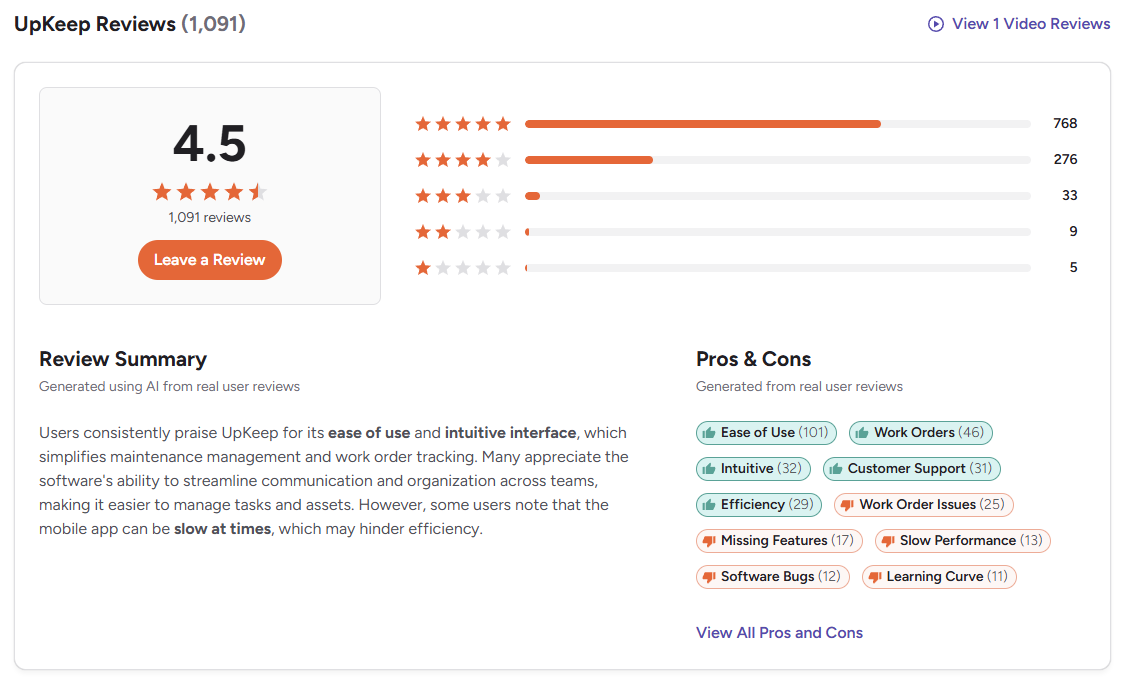
Users love how easy it is to use, especially for work order management — submitting work requests, turning them into work orders, and tracking everything in real-time. While the mobile app is intuitive, it can be sluggish in areas with poor connectivity.
While analyzing user reviews, we also noticed that many (both positive and negative) reviews include complaints about odd bugs: “The one thing I don't like is the amount of little bugs and glitches from time to time, and when you get used to using it one way, they come up with an upgrade then you have to learn the new way, but that is evolution.”
This doesn’t seem to be a deal-breaker for everyone, but it is something to keep in mind if you’re leaning in the direction of UpKeep.
The verdict: When to opt for eMaint vs UpKeep
Choosing between eMaint and UpKeep boils down to one key decision: do you prioritize depth of asset and reliability data or mobile experience and adoption?
Opt for eMaint if: You operate in a heavy industrial environment where downtime is extremely costly, and asset performance is mission-critical. If you plan to invest in condition monitoring tools like Fluke sensors, require deep ERP integrations (e.g., SAP), and need a highly customizable platform to manage complex asset lifecycles, eMaint delivers the control and depth you need.
Opt for UpKeep if: You manage a facility or light manufacturing operation where your biggest challenges are communication, coordination, and execution. If your goal is to move off paper quickly, streamline daily maintenance tasks, and ensure fast adoption with minimal training, UpKeep is a better fit.
If you do not like these trade-offs, there is a solution that gets you the best of both worlds. It’s called Limble, and it provides the intuitive mobile experience of UpKeep with deep asset hierarchy, scalability, and sensor-driven automation found in eMaint.
Why you should choose Limble instead
Limble is built for modern maintenance teams that need to maximize asset performance without sacrificing usability. You get powerful functionality wrapped in an intuitive, technician-friendly solution.
Here’s where Limble stands out:
- A mobile app that actually works: Limble’s native iOS and Android app is fast, reliable, easy to navigate, and works offline. Technicians can complete work orders, log data, and access asset history in seconds — which means you get cleaner, more consistent data from the field.
- Plug-and-play IoT automation: You don’t need a complex legacy system to implement predictive maintenance. Limble offers native IoT sensors that attach to your equipment and automatically trigger work orders when anomalies like vibration or temperature changes are detected.
- Actionable reporting in seconds: Unlike eMaint, where building reports can feel overly technical, Limble’s drag-and-drop report builder makes it easy to track and share downtime, costs, and other key KPIs.
- Enterprise scalability without the clutter: Manage multi-site operations, build complex asset hierarchies, and quickly integrate with various hardware and software solutions — all without the steep learning curve or bloated interface of legacy systems.
- Practical AI: Limble’s AI is built into everyday workflows — turn service manuals into PM schedules, optimize resource allocation with smart suggestions, prevent duplicate work requests, improve forecasting, and access a game-changing MCP connection.
All of this is reflected in user sentiment. We wear our industry-leading 4.8 out of 5 review score on both G2 and Capterra with pride.
Limble users consistently highlight ease of use, robust features, great mobile app, and strong customer support as key reasons they chose Limble over other CMMS platforms:
- Limble's team makes implementation super easy. [“All the important work was done in one day. Implementing Limble was super easy. Entering assets was really easy. Using voice-to-text and entering work order and pictures was really easy.” — Matt Olson, Facility and Reliability Manager at Bentek]
- Better data accuracy because technicians actually use the system in the field. [“Limble is the easiest platform to navigate. It takes minutes to complete a task, even for team members who aren’t tech-savvy.” — Ronnie Woodall, Regional Maintenance & Production Manager at Cornerstone Building Brands]
- Improved preventive maintenance compliance and asset uptime. [“A single hour of downtime costs us up to $30,000-$40,000. Before switching to Limble, we were seeing downtime all over the place. Now, we’re at 98% uptime.” — Josh, Engineer and Maintenance Manager at Island Abbey Nutritionals]
- Flexibility and customization to match the needs of specific locations. [“What stuck out to us was Limble’s ability to help us customize everything.” — Lanna Keene, Maintenance Director at Glo Tanning]
- Customer support that’s always just one click away. [“The help button is by far one of the greatest functions. This level of customer service is hard to find, they have recorded videos and sent to me to walk me through the steps. Our customer success manager has been a complete rockstar in allowing us to get our system implemented and functioning within a few weeks while answering all our questions promptly and efficiently.” — Chris B., Maintenance Planner/Scheduler, G2]
Limble: The ideal alternative to eMaint and UpKeep
Choosing a CMMS isn’t just about solving today’s problems — your goal should be to set your team up for long-term success.
Many teams choose UpKeep for its simplicity, only to outgrow it as their operations become more complex. Others invest in eMaint for its power, only to struggle with slow adoption and usability challenges that limit its impact.
Either way, you risk hitting a ceiling or creating friction that holds your team back.
Limble is built to scale with you from day one:
- Start with an intuitive platform that is easy to set up, and your team can start using it with minimal training.
- Grow into advanced asset management, automation, and cost reporting as your needs evolve.
- Expand across multiple sites, teams, and systems without having to rebuild your workflows or pay for expensive customizations and integrations.
Instead of switching systems later — or forcing your team to work around limitations — you get a platform that adjusts to the size and needs of your organization.
Schedule a personalized Limble demo to see the platform in action!