
eMaint vs IBM Maximo: Which EAM Wins in 2026?
Upgrading from a lightweight computerized maintenance management system to a true EAM platform is a major, often multi-million-dollar decision. When organizations reach this level of complexity, they typically evaluate two long-standing platforms: eMaint CMMS and IBM Maximo Application Suite.
IBM Maximo is the undisputed heavyweight of enterprise asset management. It is designed to manage supply chains, complex procurement, and massive linear assets across large organizations. However, it is also an IT-heavy, monolithic platform that can take years to implement — and its interface is often criticized for being difficult for frontline teams to use.
On the other side is eMaint (by Fluke Reliability). It has a narrower focus on maintenance and reliability, with strong integrations with condition-monitoring hardware and highly customizable modules. While it is more maintenance-centric than Maximo, its desktop and mobile user experience still feels dated, and the setup can be quite complex.
So, do you invest in Maximo’s unmatched scale and IT ecosystem? Or lean into eMaint’s reliability-focused platform and hardware integrations?
This guide breaks down the key differences between eMaint and Maximo. We will look at functionality, pricing, usability, ideal use cases, and user sentiment.
For those who are not satisfied with either solution, we will throw in a modern EAM alternative in the mix that delivers deep asset insights without the agonizing implementation or learning curve.
eMaint vs IBM Maximo: Key similarities and differences
Both eMaint and Maximo are enterprise-grade platforms designed to help you manage assets, maintenance operations, and reliability programs at scale. If your organization runs complex operations — such as manufacturing plants, utilities, or infrastructure networks — these platforms can centralize maintenance data and improve asset visibility across multiple locations.
Interestingly, both platforms struggle in similar areas. The mobile experience can feel clunky compared to modern CMMS tools, which makes adoption harder for frontline technicians. In addition, setup and customization often require significant time, training, and IT support, especially for organizations trying to adjust the software for unique workflows and specific compliance requirements.
Let’s now switch gears and look at the core differences between eMaint and IBM Maximo:
- Scale and focus: IBM Maximo is built for organizations managing massive asset ecosystems such as utilities or transportation networks. eMaint, while still robust, doesn’t offer all of the features found in Maximo.
- Implementation complexity: Maximo implementations can take months or even years, especially in global environments with complex integrations. eMaint typically deploys faster, though larger setups can still require months of consulting and configuration.
- Condition monitoring ecosystem: As you would expect, eMaint integrates with Fluke Reliability hardware, including sensors and vibration monitoring tools. Maximo supports predictive maintenance, but typically relies more on analytics platforms and external integrations.
- User experience and accessibility: Maximo is powerful but often complex to navigate, particularly for technicians in the field. eMaint is somewhat easier to learn, though the interface still feels dated compared to modern CMMS platforms.
- IT ecosystem and integrations: Maximo connects deeply with IBM’s enterprise software ecosystem, including analytics and AI tools. eMaint’s integrations focus more on reliability technologies and maintenance workflows.
- Deployment flexibility: Maximo supports cloud, hybrid, and on-premise deployments, making it common in regulated industries. eMaint also supports on-premise deployment, but most businesses prefer the cloud-based implementation.
Quick comparisons can never tell the full story, so let’s dedicate one section to each of these enterprise maintenance solutions.
eMaint: Key features, use cases, pricing, pros, cons & user reviews
eMaint is an enterprise CMMS from Fluke Reliability designed to help maintenance teams manage assets, work orders, and preventive maintenance programs. It stands out for its strong customization options and integrations with condition monitoring hardware, especially within the Fluke reliability ecosystem. The platform is widely used across manufacturing, facilities management, and other asset-intensive industries.
Key features
- Work order management: Create, assign, and track maintenance work orders while capturing labor, parts, and completion data in one centralized system.
- Preventive maintenance scheduling: Automate recurring maintenance tasks based on time, usage, or asset condition to reduce unplanned downtime.
- Asset management and tracking: Maintain a centralized record of asset history, location, performance, and maintenance activity. This visibility helps teams improve lifecycle management and decision-making.
- Multi-site inventory and parts management: Track spare parts availability, manage purchasing and stock levels, and link parts directly to work orders to reduce repair delays.
- Condition monitoring and predictive maintenance: eMaint integrates with Fluke vibration sensors and monitoring tools to detect early signs of equipment failure and automatically trigger maintenance workflows.
- Integrations: Connect eMaint to sensors, SCADA, PLC, BMS systems, Power BI, ERPs, CRMs, and many other business applications using native integrations or eMaint API.
- Customizable dashboards and reporting: The platform offers configurable dashboards, reports, and analytics, helping reliability teams to track maintenance KPIs and asset performance.
Ideal users
eMaint works best for maintenance teams that want strong customization and condition monitoring integrations. Common use cases include:
- Mid-sized to large manufacturing teams that manage many assets across one or multiple sites.
- Reliability engineering teams implementing predictive or condition-based maintenance programs.
- Organizations already using Fluke monitoring tools or sensors that want to run condition-based and predictive maintenance programs.
- Companies that want highly configurable workflows and dashboards, and do not mind the complexity that comes with that.
Strengths
The 3 most common advantages of using eMaint based on user reviews:
- Highly customizable workflows and reporting. [“I like the customization of the fields, workflows, and ability to self generate reports.” — Jason, G2]
- Strong asset and inventory management capabilities. [“We use eMaint daily for production maintenance and its very helpful keeping track of all of our maintenance inventory, actively removing parts as they are used and even populating our reorder list when on hand inventory gets low.” — Troy, G2]
- Responsive customer support and onboarding resources. [“The team has been outstanding in supporting any requests and issues we have, addressing them promptly and efficiently.” — Philip, Capterra]
Limitations
The 3 most common limitations of using eMaint based on user reviews:
- Steep learning curve during implementation. [“Although beneficial as a whole, there is a learning curve when it comes to working around the system that takes time for maintenance staff to adjust to.” — Verified User, G2]
- Customization and reporting setup can be time-consuming. [“There are a lot of setup fields, but this is something than can be learnt as with any process.” — Darren, Capterra]
- Mobile experience leaves a lot to be desired. [“I dislike the lack of mobility and communication within eMaint. You can setup workflows to notify people of updates but then all of the communications get left out of the system. Lack of mobility inhibits floor personnel from using the system.” — Logan, G2]
Pricing plans
There is no free plan or free trial available, only a product demo. Implementation support and on-site training need to be purchased as additional add-ons for all pricing plans.
The pricing is split into the following tiers:
- Team (~$69/user/month): Includes all of the basic CMMS functionality for smaller teams.
- Professional (~$85/user/month): Adds interactive dashboards, custom workflows, mobile app, enhanced reporting, and some multi-site capabilities.
- Enterprise (custom quote): Unlocks additional multi-site capabilities, custom and API integrations, and predictive maintenance tools.
Overall user sentiment
While not a crowd favorite compared to solutions like MaintainX and Limble, eMaint has a broadly positive user sentiment on big review sites like G2 (4.5 score based on 230 reviews) and Capterra (4.4 score based on 330 reviews).

To no surprise, the ability to customize everything comes at the cost of greater complexity, steeper learning curves, and a somewhat longer setup. It seems that eMaint is aware of that, as several users praise their customer support, which is quick to help with setting up reports and resolving various technical challenges.
IBM Maximo: Key features, use cases, pricing, pros, cons & user reviews
IBM Maximo Application Suite is a comprehensive enterprise asset management (EAM) platform designed for organizations managing large, complex asset networks. It helps you track assets, schedule maintenance, manage inventory, and analyze asset performance across multiple sites. It is widely used in industries where asset reliability, compliance, and infrastructure management are critical.
Key features
- Enterprise asset management: Track the full lifecycle of assets — from procurement and installation to maintenance and retirement — across multiple facilities and regions.
- Work order and maintenance management: Plan, schedule, and track maintenance activities with detailed work orders, preventive maintenance schedules, and labor tracking.
- Inventory and procurement management: Manage spare parts inventory, automate reordering, and connect maintenance workflows with purchasing and supplier management.
- Predictive maintenance and analytics: Use analytics and condition monitoring data to identify potential asset failures before they occur and optimize maintenance planning.
- Asset performance monitoring: Track asset performance metrics and reliability indicators to identify inefficiencies and improve asset utilization.
- Mobile access for field teams: Technicians can access work orders, asset data, and maintenance instructions from mobile devices while working in the field.
- Integration with enterprise systems: Connect Maximo with ERP, IoT platforms, and other enterprise tools to create a centralized asset and operations management environment.
Ideal users
IBM Maximo is best suited for organizations managing large, complex asset portfolios. Typical use cases include:
- Utilities and energy providers managing power grids, pipelines, and large infrastructure assets.
- Transportation and logistics organizations maintaining railways, fleets, or airports.
- Manufacturing enterprises operating multiple plants and large equipment networks.
- Government and public infrastructure agencies responsible for roads, water systems, and public assets.
- Asset-intensive industries such as oil and gas, mining, and heavy industry.
Strenghts
The three most common advantages of using Maximo based on user reviews:
- Able to handle large asset portfolios across multiple sites and global operations. [“I appreciate the flexibility and scalability of the IBM Maximo Application Suite. Its containerized architecture is a standout feature, as it allows the software to scale seamlessly across an entire organization, from a single plant to hundreds of sites worldwide.” — Khushivant, G2]
- Deep customization capabilities for workflows and integrations. [“It's so customizable you won't have enough time to use all its capabilities. It's a really robust platform which will benefit all you company.” — Jair, Capterra]
- Advanced reporting, analytics, and predictive maintenance tools. [“To me, what was the most impressive thing in IBM Maximo Application Suite is the powerful AI-driven predictive maintenance it demonstrates. The suite applies advanced analytics and IoT integrations in proactive asset management and monitoring to seriously reduce downtime and enhance operational efficiency.” — Verified User, G2]
Limitations
User reviews also highlight several common challenges:
- Complex implementation and setup. [“One aspect of the IBM Maximo Application Suite that I find challenging is the initial setup and configuration process, which can be quite complex and time-consuming, especially for teams that are new to the system.” — Sachin, G2]
- Steep learning curve for new users, especially technicians. [“Large learning curve to use it, not intuitive.” — Amanda, Capterra]
- The user interface is hard to navigate and feels dated. [“While IBM Maximo is a powerful tool, one thing I dislike is that the user interface can be complex and not very intuitive, especially for new or occasional users. It often requires multiple clicks to complete basic tasks, and without proper training, navigating between modules can be overwhelming.” — Jeremiah, G2]
Pricing plans
Maximo pricing is not publicly listed; you need a custom quote from IBM. Costs involve enterprise licensing and vary based on deployment type, number of users, integrations, modules used, and implementation and consulting services required.
Overall user sentiment
IBM Maximo Application Suite has a slightly more negative user sentiment than eMaint, with a 4.4 score on G2 (based on 617 reviews) and a 4.2 score on Capterra (based on 82 reviews).
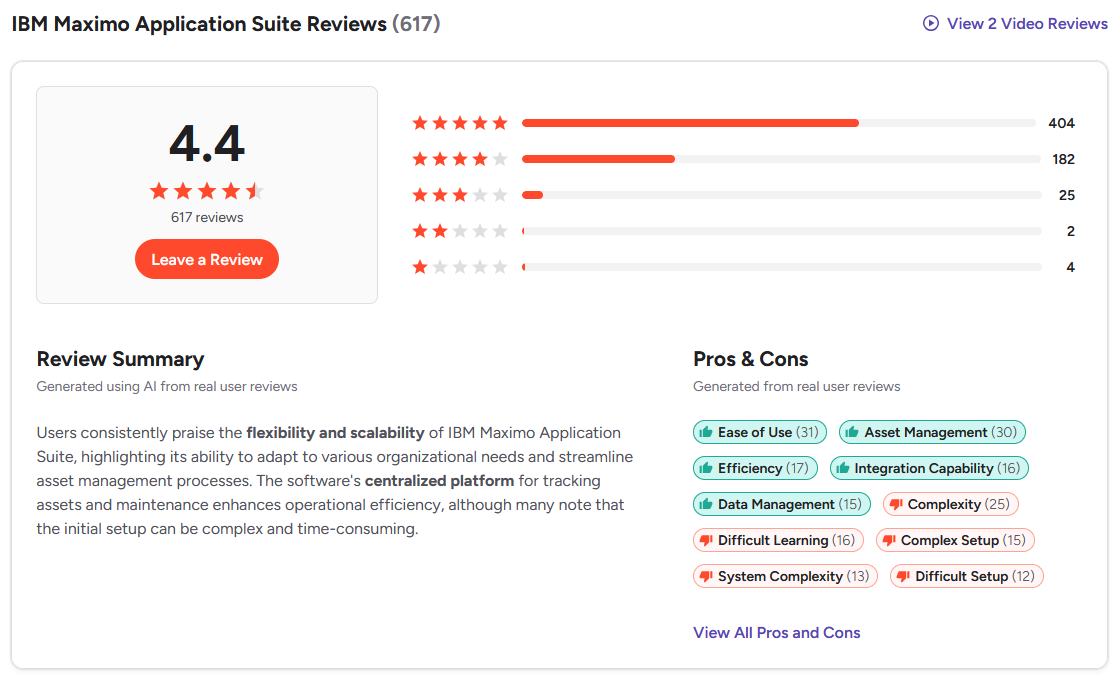
As far as the pros and cons go, we’ve already touched on all of the major beats. Insane flexibility, scalability, and asset insights that come at the cost of, well, high implementation costs and long initial setup.
The verdict: When to opt for eMaint vs IBM Maximo
Choosing between these two enterprise platforms largely depends on your industry, operational complexity, and who is leading the software decision — IT or maintenance. Both platforms can support large asset portfolios, but they are built with slightly different priorities in mind.
Opt for eMaint if:
- You are a manufacturer focused on reliability and asset performance.
- Your maintenance department is driving the software decision.
- You want native condition monitoring integrations, especially with Fluke Reliability sensors and monitoring tools.
- You want the deep customization that Maximo offers, but want faster deployment at a lower total cost.
Opt for IBM Maximo if:
- You are in the utilities industry, an energy provider, and transportation networks that manage infrastructure spread across wide geographic areas.
- You run a global organization that requires deep integration with ERP systems and financial processes to ensure compliance with strict regulatory and reporting requirements.
- You have a dedicated IT team to manage configuration, integrations, and long-term maintenance.
- You are fine with the lengthy implementation and training process in order to access all of the powerful features and integrations IBM provides.
Historically, organizations that needed enterprise-grade asset tracking, ERP integrations, and IoT condition monitoring often had to accept poor usability. Companies invested heavily in platforms like Maximo or eMaint, paid significant consulting fees, and still struggled with adoption caused by complexity and poor user experience.
In 2026, that trade-off is no longer necessary. There are platforms that can deliver enterprise-grade data architecture without sacrificing usability or deployment speed.
Limble represents that new generation of enterprise maintenance software. It combines robust asset management capabilities with a modern, technician-friendly mobile experience. You can deploy the system in just a few weeks with minimal training required for frontline teams.
When to pick Limble instead
Limble is built for organizations that need enterprise-grade asset management without sacrificing frontline usability or deployment speed.
You get the scalability and data depth expected from traditional EAM platforms — without the never-ending implementation projects, skyrocketing costs, or complex user interfaces that ruin adoption.
Here are the key Limble advantages:
- Enterprise scalability without legacy bloat: Limble allows you to build complex asset hierarchies (System > Parent > Child > Component) and manage multi-site inventory. You get detailed asset tracking found in Maximo and eMaint without the click-heavy workflows that often slow down technicians.
- A mobile app technicians actually use: Unlike Maximo’s clunky add-ons or eMaint’s dated interface, Limble’s native mobile app is lightning-fast, intuitive, and works offline. When technicians like the app, you get 100% accurate, real-time data from the floor.
- Plug-and-play IoT automation: You don't need a massive IT project to achieve predictive maintenance. Limble offers modular IoT sensors and integrates with a predictive analytics platform. When anomalies occur, the system can automatically trigger alerts or work orders.
- Fast implementation and rapid ROI: Legacy EAM deployments can take months or even years to complete. With Limble’s modern architecture and dedicated customer support team, most organizations are fully deployed in weeks. Many organizations start to see results within 4-6 weeks of implementation.
Limble user reviews consistently highlight ease of use, fast onboarding, mobile-first features, and strong customer support as key reasons teams choose Limble over other CMMS platforms.
Real-world results include:
- Higher technician adoption rates thanks to a simple mobile-first interface. [“Limble is the easiest platform to navigate. It takes minutes to complete a task, even for team members who aren’t tech-savvy.” — Ronnie Woodall, Regional Maintenance & Production Manager at Cornerstone Building Brands]
- Faster CMMS implementation compared to traditional enterprise systems. [“The wonderful thing about Limble was it was just so darn easy to get implemented to a point where it really started adding value.” — Dustin Law, Engineering Manager at Western Pulp]
- Better maintenance data accuracy because technicians actually use the system in the field. [“The mobile platform is phenominal and we have had no issues while using it to date.” — Chris B. on G2 ]
- Smarter decision-making that helps reduce costs and make smarter purchases. [“Limble has made capital requests for new equipment more effective because now we can show – with data – the average equipment lifespan and what parts, consumables, and man hours have gone into maintaining an asset.” — Adam Ferran, Maintenance Manager at Liberty Safe]
- Improved preventive maintenance compliance and asset uptime. [“A single hour of downtime costs us up to $30,000-$40,000. Before switching to Limble, we were seeing downtime all over the place. Now, we’re at 98% uptime.” — Josh, Engineer and Maintenance Manager at Island Abbey Nutritionals]
Limble — The ideal alternative to eMaint and IBM MAS
Enterprise maintenance software has to satisfy three very different audiences:
- Executive leadership wants clear asset performance data and cost visibility.
- Maintenance and reliability leaders need powerful planning and reporting tools, preventive maintenance automation, workflow customization, and detailed asset history to improve uptime and reduce costs.
- Technicians and operators need a fast, user-friendly mobile app to complete work orders in the field and quickly access specific information on parts, assets, and schedules.
Legacy platforms like eMaint and IBM Maximo often deliver the insights and automations — but struggle to provide the usability frontline teams need.
Limble delivers all three. You get enterprise-grade asset management and analytics, powerful reliability and scheduling tools, and a modern mobile experience.
The best part? Our amazing support team will help you set everything up and hit the ground running in no time.
Schedule a personalized Limble demo to see the platform in action and get answers to any questions about customization, integrations, or deployment timeline.