
What Security Features Should a Modern CMMS Have?
We are way past the time when maintenance data was just a log of completed repairs. Today, it’s critical business intelligence.
When you open a CMMS, you’ll often find facility blueprints, proprietary asset data, maintenance histories, vendor records, and employee information. A security breach does not just mean lost files — it can lead to operational shutdown, compliance violations, and financial loss.
As industrial organizations shift to cloud-based CMMS software, the cyber attack surface expands. According to IBM’s Cost of a Data Breach Report, the global average cost of a data breach reached $4.4 million in 2023, the highest on record. To make things worse, manufacturing has remained one of the most targeted industries for ransomware attacks.
For maintenance and IT leaders tasked to evaluate maintenance software, CMMS security has to be one of the core operational requirements.
This guide explains the essential security features every modern CMMS should include to keep your data (and assets) secure and compliant. Plus, we compare what the most popular CMMS platforms offer in terms of security and data management.
The consequences of poor CMMS security
CMMS security refers to the policies, technologies, and controls that protect your maintenance management software from unauthorized access, data loss, and cyberattacks. When those protections are weak — or missing entirely — it creates operational, financial, and legal risks that directly affect your bottom line.
Here is what can happen when your maintenance software lacks strong security controls:
- Operational downtime: A ransomware attack can lock you out of work orders, asset histories, and preventive maintenance schedules. Without access to that data, technicians cannot work efficiently, and critical assets may fail.
- Data loss or corruption: Lost maintenance histories, asset documentation, and compliance records can set your team back months — or permanently erase valuable institutional knowledge.
- Regulatory fines and compliance failures: Industries subject to OSHA, FDA, ISO, or other regulatory frameworks depend on accurate, auditable records. A breach or data integrity issue can lead to failed audits and financial penalties.
- Intellectual property exposure: Your CMMS may contain facility layouts, equipment specifications, and process documentation. If exposed, that information can create competitive or security risks.
- Reputational damage: Customers, partners, and stakeholders expect secure systems. A breach erodes trust and may impact future contracts.
- Increased recovery costs: Incident response, forensic investigations, legal counsel, and system restoration can quickly exceed the cost of implementing strong security controls upfront.
- Productivity loss across departments: Maintenance, operations, IT, procurement, and finance all rely on CMMS data. A compromised system does not affect just your maintenance team.
Weak CMMS or EAM security turns your maintenance platform into a liability instead of an asset. It might sound bombastic, but the right security features protect not just your sensitive data — but your ability to operate.
The 8 critical security features your CMMS should have
When evaluating a computerized maintenance management system, you should look for specific, documented security controls — not vague claims about being “secure” or “enterprise-grade.”
Here’s a list of security features to pay attention to.
1. SOC 2 Type II compliance
This is the gold standard for SaaS security. A SOC 2 Type II report confirms that an independent third-party auditor has evaluated a vendor’s controls against the American Institute of Certified Public Accountants (AICPA) Trust Services Criteria.
“Type II” specifically (as there is also Type I), means the auditor tested those controls over time — typically 6 to 12 months — not just during a one-time review.
This matters because it verifies that the vendor’s security processes for data protection, availability, confidentiality, processing integrity, and privacy are not only documented but consistently followed.
2. Single sign-on (SSO) and MFA
Single sign-on (SSO) allows users to access your CMMS using a centralized identity provider — such as Microsoft Entra ID, Okta, or Google Workspace — instead of creating separate login credentials for the CMMS.
With SSO, your IT team manages authentication policies in one place. When an employee leaves the company, disabling their corporate account immediately removes user access to the CMMS. This reduces the risk of orphaned accounts and weak password practices.
Multi-factor authentication (MFA) adds a second layer of verification beyond a password. After entering their credentials, users must confirm their identity using a mobile authentication app, biometrics, or a one-time code.
MFA significantly reduces the risk of unauthorized access — even if passwords are stolen through phishing or reused across systems. Microsoft security research says that MFA can block more than 99.9% of automated account compromise attacks.
3. Role-based access control (RBAC)
Instead of giving everyone broad access to your CMMS, Role-based access control (RBAC) assigns permissions by role — such as technician, maintenance manager, contractor, inventory clerk, or administrator.
Each assigned user role grants or restricts a user's ability to perform actions and view specific information. For example:
- Technicians can only view and complete assigned work orders.
- Supervisors can also approve work orders and generate reports.
- Administrators can manage all system settings and user permissions.
- Finance users can access cost data, but not edit maintenance records.
This structure enforces the principle of least privilege, meaning users only have access to what they truly need.
For reference, Limble comes with four predefined roles: super user (administrator), manager, technician, and view-only. You can add additional ones, as well as go granular and modify specific permissions for all roles.
4. Data encryption (at rest and in transit)
Data encryption protects your maintenance data by converting it into unreadable code that can only be decrypted with the proper key.
A secure CMMS should encrypt data in two critical states: in transit and at rest.
Encryption in transit protects data as it moves between devices and servers—for example, when a technician submits a work order from a mobile device over public Wi-Fi. This protection is typically enforced using the TLS 1.2 or TLS 1.3 protocol, preventing attackers from intercepting or altering data in transit.
Encryption at rest protects stored data within databases, backups, and cloud storage systems. This is commonly implemented using strong encryption standards like AES-256. This way, even if the hard drives were copied, the data would be useless gibberish without the decryption key.
When evaluating a CMMS vendor, ask specifically:
- What encryption protocols are used in transit?
- What encryption standards protect stored data?
- How are encryption keys managed and rotated?
Most platforms get this right, but it doesn’t hurt to double-check.
5. Automated backups and disaster recovery
How fast can your CMMS vendor help you recover in case of a cyberattack, system failure, or severe human error? When an hour of downtime costs you $100k+, every minute matters.
A secure CMMS should perform regular, automated backups of your database and system configurations. These backups should be stored in geographically separate environments to protect against localized outages or disasters.
Every CMMS provider should clearly define:
- How often backups occur.
- Where backups are stored.
- How long data is retained.
- What their guaranteed recovery time objective (RTO) is. RTO represents the maximum acceptable amount of time your system can be down after an incident.
Without automated backups, you risk permanent data loss. Without a tested disaster recovery plan, you risk extended downtime.
6. Penetration testing and vulnerability scans
Secure software is tested software.
Leading CMMS vendors conduct regular third-party penetration testing, also known as ethical hacking. In these assessments, independent security experts actively attempt to break into the system — just like a real attacker would. After testing, the vendor receives a detailed report outlining vulnerabilities and required remediation steps.
In addition to manual testing, your CMMS provider should run automated vulnerability scans throughout the development lifecycle. These scans analyze code for known security flaws every time an update or feature release is deployed.
This continuous testing approach helps detect security bugs early and stops new software updates from accidentally reintroducing old security problems.
7. Physically secure infrastructure
Top CMMS software providers host their applications on enterprise-grade cloud platforms such as Amazon Web Services, Microsoft Azure, or Google Cloud.
These facilities are designed to protect infrastructure from physical intrusion (armed guards, biometrics), environmental threats, and power failures. Those protections far exceed what most on-premise server rooms can provide.
8. Audit logs and activity monitoring
Audit logging records who accessed your CMMS, what actions they took, and when those actions occurred.
A secure CMMS should provide the logs for:
- User login history
- Permission changes
- Record edits and deletions
- API activity
- Administrative configuration changes.
These logs create traceability and accountability. If a security incident occurs — or if you need to investigate a compliance issue — you can quickly determine what happened.
Audit logs also support regulatory requirements in industries governed by ISO, FDA, SOX, or similar standards.
Without detailed logging, you may not know a breach occurred until significant damage is done.
Steps to evaluate CMMS security features
Most vendors will claim they are “secure” or “enterprise-ready.” Your job is to validate those claims with documentation, metrics, and transparency.
1. Use the “trust but verify” method
Do not just ask a vendor if their CMMS is secure — ask them to explain how. Send these specific questions to their sales team:
- Can you provide your most recent SOC 2 Type II report? Type II verifies that security controls were tested over time — not just reviewed at a single point. Type I reports only evaluate whether controls exist on paper.
- When was your last third-party penetration test conducted, and can we review the executive summary of the findings? Recent independent testing shows the vendor actively looks for weaknesses and makes their solution as secure as possible.
- Which cloud provider do you use (AWS, Azure, or GCP), and where are the data centers physically located? Data residency can affect GDPR compliance and industry-specific regulatory requirements.
- What are your RTO (Recovery Time Objective) and RPO (Recovery Point Objective) metrics? It’s important to know how quickly the system will be restored after a disruption, and how much data could potentially be lost.
On top of these questions, don’t hesitate to ask about all of the other critical security features we discussed, from access control and encryption to audit logging and incident response plans.
Vendors that cannot provide clear, documented answers to these questions may not have a mature security program in place.
2. Inspect the shared responsibility model
Security is divided between the CMMS vendor and you. No one side can be responsible for everything.
The vendor’s responsibility:
- Securing the physical data centers.
- Protecting the network infrastructure.
- Hardening servers and databases.
- Maintaining secure application code.
- Performing backups and disaster recovery.
Your responsibility:
- Managing user permissions.
- Enforcing internal password policies.
- Enabling MFA and SSO (if available).
- Offboarding employees promptly and properly.
- Following other IT policies and data management best practices.
You need to work together. For example, your teams should disable accounts for former employees, but the vendor should provide administrative controls that allow you to do so with a few simple clicks.
3. Review their status page history
One security aspect that is not talked about enough is system availability.
Most reputable SaaS providers maintain a page that shows historical uptime, outages, and incident reports. Before signing with a CMMS vendor, check that page.
Here’s a screenshot from Limble’s public uptime page:
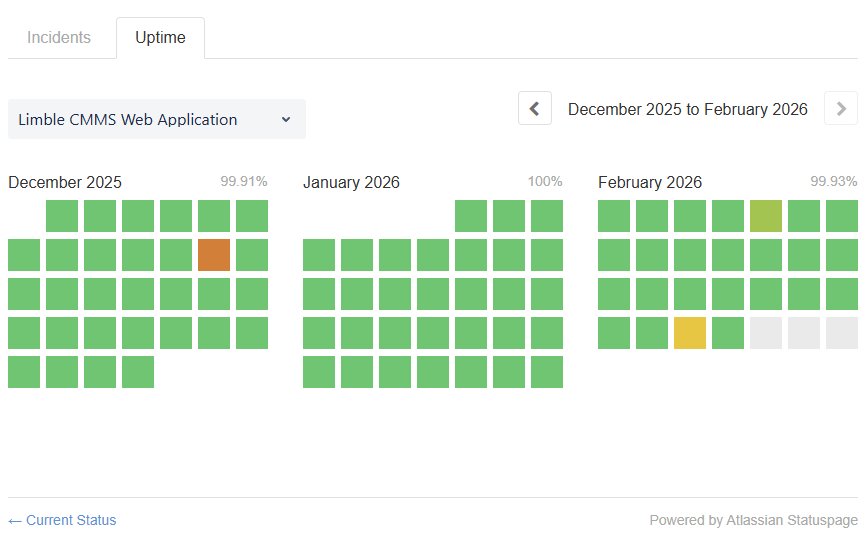
When reviewing the status page, look for:
- A clear breakdown between availability and uptime of their desktop, mobile app, API, and authentication services.
- Clear timestamps for incidents.
- Transparent explanations of what happened (and potential preventive steps taken).
- Realistic uptime numbers (100% uptime over a whole year is often a sign of dishonest reporting).
A vendor that clearly documents outages and corrective actions demonstrates operational maturity and reliability.
4. Watch for these CMMS security issues and red flags
If a provider responds with vague answers or dismisses basic security standards, proceed with caution. Security weaknesses often reveal themselves during early conversations — if you know what to look for.
Be wary if you hear any of the following:
- “We are working on SOC 2.” → This typically means they do not currently have independent verification of their security controls.
- “You don’t really need SSO.” → Strong passwords alone do not stop phishing attacks or credential reuse. Modern security relies on MFA and centralized identity management.
- “We host the servers locally.” → Unless the vendor is a large enterprise with dedicated security infrastructure, a private server room rarely matches the physical security, redundancy, and monitoring of enterprise cloud platforms.
- “We have never had an outage.” → No SaaS platform operates perfectly forever. A claim of zero incidents often indicates a lack of transparency or poor tracking.
- “Security details are proprietary.” → Vendors can’t share sensitive internal documentation publicly. However, they should provide high-level architecture explanations, certifications, and executive summaries under NDA.
If a vendor cannot clearly explain how they protect your maintenance data, assume the risk is higher than advertised.
How top CMMS vendors compare in terms of security
Most leading CMMS vendors understand that foundational security controls are no longer optional. Features like SSO, automated backups, and audit logs are increasingly considered baseline requirements.
That said, security certifications and feature availability can change over time, and not all vendors publish complete details publicly. Some documentation is only available under NDA, and some vendors may update certifications, infrastructure, or policies after this comparison is published.
The table below reflects publicly available information at the time of writing. However, you should always verify security claims directly with each vendor you’re considering.
How Limble ensures your data remains safe and secure
We understand that your CMMS holds critical operational data, sensitive employee information, and proprietary asset records. Protecting that data is part of our responsibility to you.
Here’s what we do to prove that:
- SOC 2 Type II compliant: We continually renew our SOC 2 Type II certification to maintain and prove the high level of our security controls.
- Enterprise SSO integration: Seamlessly connects with Okta, Microsoft Entra ID (Azure AD), and Google for secure, centralized authentication. Your team gets secure, one-click access while IT maintains full identity control.
- Granular role-based access control: Define custom roles and exactly who can view, edit, approve, or export data. Restrict financial information, limit contractor visibility, and align permissions with your organizational hierarchy.
- Incident response plans: Detailed procedures ensure any security incidents are promptly identified, investigated, and resolved with minimal impact on our services.
- Transparent security practices: We clearly outline our certifications, security practices, penetration testing results, and other security info on our trust page.
- Well-informed team: Our employees receive regular security awareness training and have the knowledge to identify and mitigate security risks.
- Trusted by global leaders: Organizations like McDonald's, Nike, and PepsiCo rely on Limble—companies that demand the highest standards of reliability, scalability, and data protection.
Don’t let security be a question mark in your CMMS decision.
If you are evaluating maintenance software and want to see how Limble protects your data in practice, book a 1-on-1 product demo. We can walk you through our security architecture and show you exactly how your information stays protected.
FAQs
Q: What role do IT departments have in securing CMMS data?
A: The vendor secures the infrastructure and application. Your IT team secures access and usage. That includes managing user permissions, enforcing SSO and MFA, offboarding employees, and aligning the CMMS with internal security policies. Even the most secure platform can become vulnerable without strong internal governance.
Q: Is on-premise CMMS more secure than a cloud-based CMMS?
A: In the past, on-premise systems were viewed as more secure because they were physically controlled by the organization. However, modern cloud providers invest billions of dollars annually in security infrastructure, monitoring, and compliance certifications.
If your organization lacks dedicated resources to address cyber threats, an enterprise-grade cloud CMMS may offer stronger security controls than a locally hosted system.
Q: How does a CMMS help with regulatory compliance?
A: A CMMS supports compliance by creating accurate, time-stamped maintenance records.
It provides digital work histories, preventive maintenance tracking, and audit trails that demonstrate accountability. Security features like RBAC and encryption protect the integrity of those records.
Q: What happens if a CMMS vendor experiences a data breach?
A: A reputable vendor should have a documented incident response plan. You should expect prompt notification, investigation, containment, and clear communication about the impact. Strong backup and disaster recovery processes help restore service quickly and limit data loss.
Q: What security certifications should a CMMS vendor have?
A: The most important baseline certification is SOC 2 Type II, which verifies that security controls are tested over time by an independent auditor.
Other valuable certifications and standards include:
- ISO/IEC 27001: International standard for information security management systems.
- GDPR alignment: Required for organizations operating in or serving the EU.
- HIPAA safeguards: Relevant for healthcare environments.
- FERPA alignment: Required for institutions that handle student education records in the United States.
- FedRAMP authorization: Required for U.S. federal agencies using cloud software.
Not every organization requires every certification. However, vendors that maintain independent security audits demonstrate long-term commitment to protecting customer data.