
Meet Smart Parts: Limble's AI-Powered Parts Inventory Tool
Earlier this year, we introduced Asset Snap on the Limble web app, giving teams a faster way to add asset details using AI. Teams quickly adopted it as a faster way to get asset data into Limble, and customers started asking for the same experience when adding parts.
That customer feedback helped shape our latest release: Smart Parts.
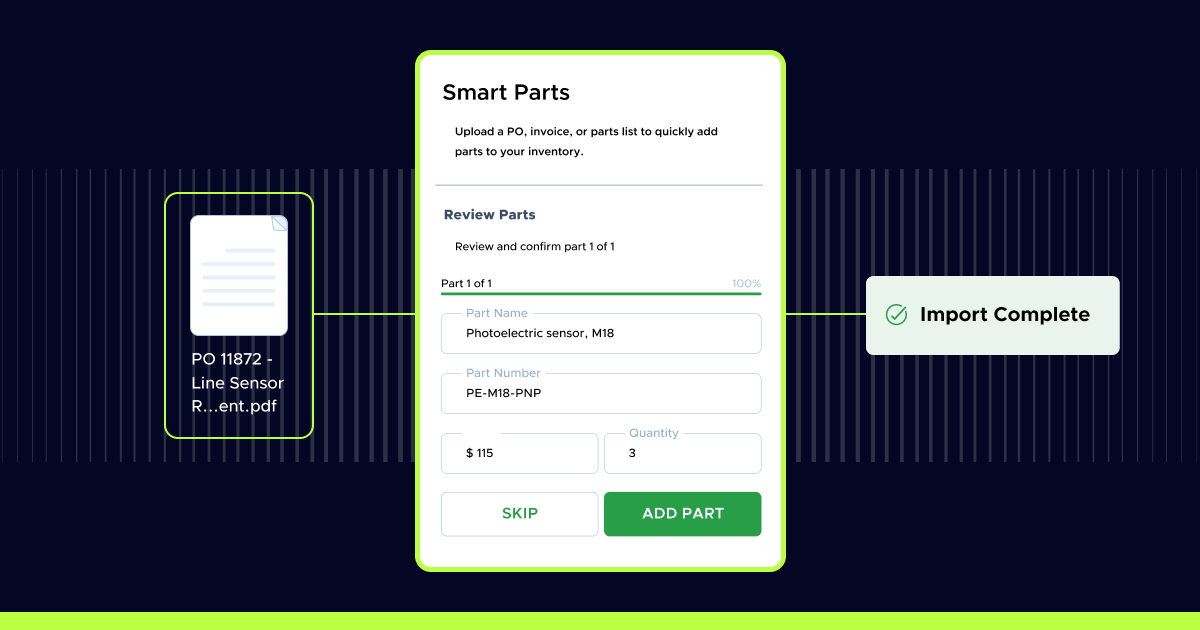
Smart Parts helps maintenance teams add inventory parts faster with AI-powered data extraction. Upload a purchase order, invoice, or parts list, and Limble's AI automatically extracts the key details needed to create parts in your inventory, so you can add multiple parts at once without manual data entry.
These releases are part of a growing set of AI-powered tools designed to help maintenance teams build cleaner, more complete data with less effort.
Turn invoices and purchase orders into inventory parts
Adding parts from invoices and purchase orders takes time. Teams often copy, paste, and verify line items manually, increasing the risk of errors. And when you're working with long invoices or large shipments, the process quickly becomes tedious.
Smart Parts was built to simplify that process by turning documents into inventory data automatically, so teams can spend less time on data entry and more time on maintenance work.
How Smart Parts works
Once you upload a document—a PO, invoice, parts list, or photo—Limble's AI automatically extracts the key details needed to create parts in your inventory.
Smart Parts pulls in:
- Part names
- Part numbers
- Prices
- Quantities
Once the information is extracted, you review each item, adjust anything that's off, and add the parts you want to inventory. Limble flags duplicate part numbers and lets you skip unnecessary line items, replacing manual copy-and-paste with a quick review step.
Built for real maintenance workflows
Smart Parts helps teams move faster while keeping inventory accurate.
It's especially useful when:
- A shipment arrives with multiple parts
- You're setting up inventory for the first time
- You're expanding or cleaning up an existing parts list
- You need parts entered quickly so technicians can keep working
Alongside Asset Snap, Smart Parts is part of Limble's broader approach to making data capture faster and more consistent from the start.
Faster setup leads to better adoption
Getting value from your maintenance platform starts with getting data into the system, but that's often where teams get stuck. By removing one of the biggest sources of friction, Smart Parts helps teams:
- Get parts into the system faster
- Reduce errors from manual data entry
- Build more consistent, reliable inventory data
When parts data is easy to add and trust, teams are far more likely to keep it accurate over time, making the system more useful for everyone.
Available now on the web app
Smart Parts is available now on the Limble web app, giving teams a faster way to turn purchase orders, invoices, and parts lists into inventory records.
To learn more and get started, visit our Help Center.