
Maintenance Connection vs Fiix: The 2026 Enterprise CMMS Showdown
Both platforms hit 4.4 stars or better on big review sites. Both promise enterprise-grade maintenance. And both will frustrate you in completely different ways.
This guide breaks down the critical differences between Maintenance Connection and Fiix CMMS. We will compare their functionality, pricing, and user reviews — and introduce an alternative that could get you the best of both worlds.
Maintenance Connection vs Fiix at a glance
Both platforms handle multi-site maintenance at enterprise scale. However, their owners pulled them in different directions.
Maintenance Connection is Accruent's CMMS and EAM platform, covering work orders, preventive maintenance, asset tracking, and inventory in one system. Compliance is its backbone with e-signatures, procedure versioning, and audit trails built to satisfy FDA and ISO requirements.
It's aimed at regulated, asset-heavy operations: hospitals, pharmaceutical plants, universities, and utilities managing thousands of assets across sites. It also runs on-premises, not just in the cloud, so you can keep data local if your regulator requires it.
Fiix is Rockwell Automation's cloud-based CMMS, built around the same core features like work orders, PMs, assets, and parts, but designed for faster adoption and deeper reliability analytics.
Over 4,500 maintenance teams use it, and the roadmap is visibly AI-first, with predictive tools that flag failure risk before it turns into downtime. It fits industrial and manufacturing teams, especially plants already running Rockwell automation equipment.
Key differences between Maintenance Connection and Fiix
Maintenance Connection and Fiix cover the CMMS basics: work orders, preventive maintenance, asset hierarchies, and parts inventory. The differences show up in what sits on top of that foundation:
- Compliance tooling: Maintenance Connection builds this in directly: e-signatures, procedure versioning, and audit trails aimed at FDA and ISO requirements. Fiix supports compliance through work order tracking and audit-ready records, but without the same dedicated documentation layer.
- Predictive analytics and AI features: Fiix flags at-risk work orders, forecasts the parts you'll need, and alerts you when maintenance spend on an asset looks unusual. Its FactoryTalk Optix feature extends this into condition-based maintenance driven by live asset data. Maintenance Connection supports condition-based maintenance and automatic triggers. Plus, its AI assistant Crue streamlines everyday tasks and surfaces actionable insights.
- Mobile usability: Both apps work offline and scan QR codes. The difference is packaging — Fiix includes mobile in every plan, while Maintenance Connection sells it as an add-on that takes the price from $110 to $168 per user per month.
- Ecosystem: Fiix sits in Rockwell's industrial stack (FactoryTalk, PLCs, SCADA, MES), so maintenance can be triggered from live machine data. Maintenance Connection sits in Accruent's built-environment suite (Meridian for documents, Observe for IoT, TMS for healthcare), so facilities teams get maintenance, documents, and building systems from one vendor. Fiix goes deep on industrial equipment; Maintenance Connection goes wide across the facility.
Maintenance Connection overview: Key features, use cases, pricing, pros, cons & user reviews
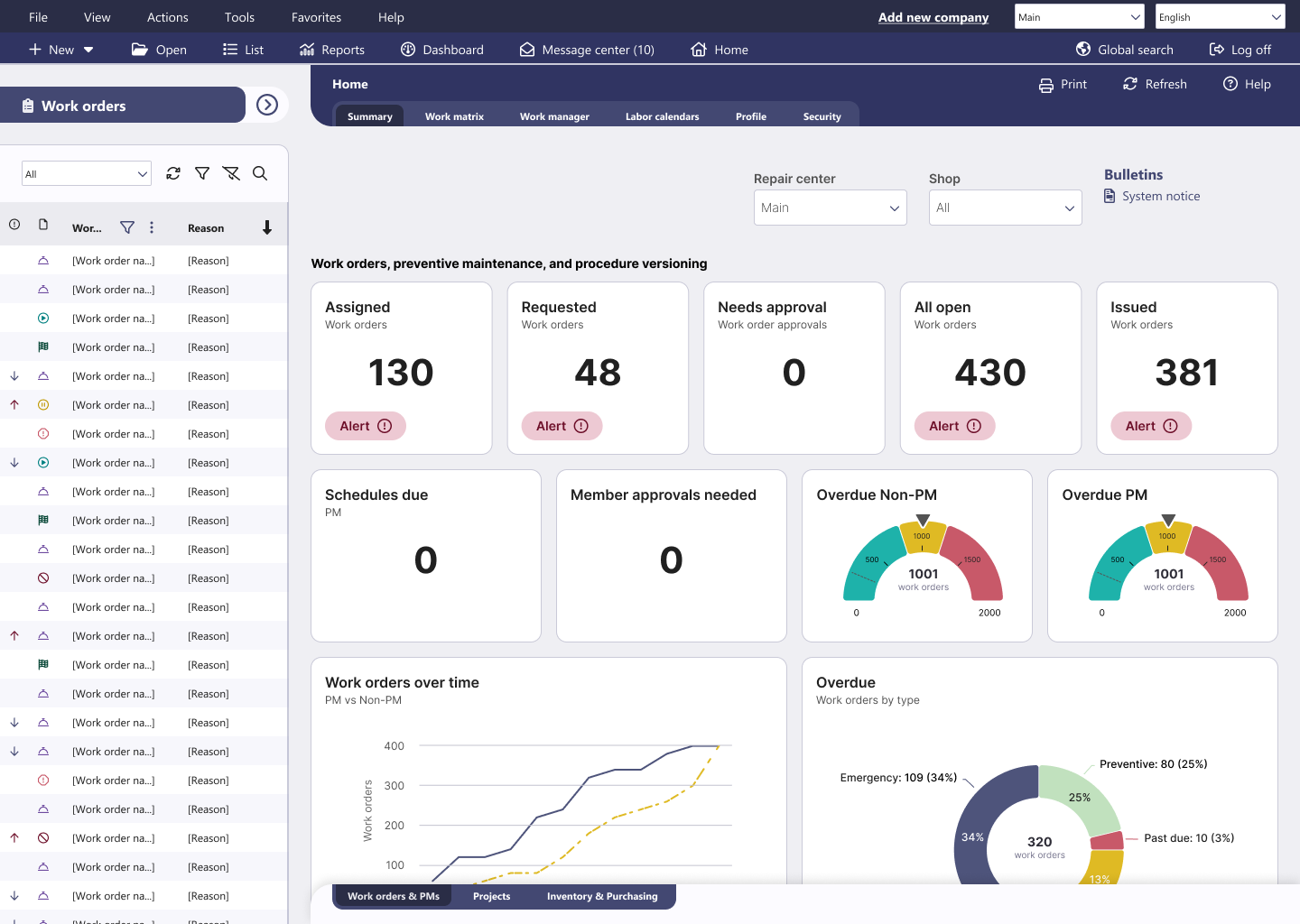
Maintenance Connection is a multi-site CMMS and EAM platform built for maintenance teams that need depth over simplicity. It brings work order management, asset and inventory control, and compliance reporting into one system that scales across facilities.
Users rate Maintenance Connection 4.4/5 on both G2 (73 reviews) and Capterra (444 reviews). Their praise centers on asset organization and tracking, highlighting the asset tree, equipment history, and centralized maintenance records.
It’s not all sunshine and rainbows, though. The same users have serious complaints about a cluttered interface with a steep learning curve and powerful reporting tools that are difficult to configure.
Let’s dive deeper into key features, pricing plans, and user reviews.
Key features
- Work order management: Create, assign, and track work orders from a single centralized hub. Standardized workflows keep technicians focused on the work instead of chasing paperwork. Alerts keep technicians, supervisors, and stakeholders updated as work orders move through each stage.
- Mobile-friendly CMMS: Technicians can manage tasks from anywhere, including areas with no signal, thanks to offline capabilities. Built-in barcode and QR code scanning speeds up asset lookups in the field.
- Actionable reporting and analytics: Configurable dashboards and reports track metrics like work order completion rates and labor costs. You get the data you need to spot recurring problems and justify budget decisions.
- Powerful CMMS security: Role-based access controls let you decide exactly who sees and edits what. Enterprise-grade protections help you meet compliance requirements and guard against external threats.
- Comprehensive integrations: A pre-built integration hub connects Maintenance Connection to ArcGIS, ERP, SCADA, HR systems, EDMS, and IoT platforms. If you need something custom, the open API handles it.
Pricing plans
Maintenance Connection publishes indicative per-user pricing, with final costs depending on your configuration. All plans require a one-year minimum contract:
- Professional ($110/user/month, 3+ users): Covers single-site to multi-site scalability, simplified integrations, full audit trail and document management, and automated notifications.
- Professional + Mobile ($168/user/month, 3+ users): Everything in Professional, plus the mobile add-on with barcode and QR scanning, comprehensive document access, images and signatures, and mobile parts and inventory management.
- Enterprise (Custom, 5+ users): Built for larger operations that need multi-site capabilities, powerful reporting and dashboards, inventory, financial, and purchasing modules, scalable infrastructure, and native EDMS and IoT integration.
What users like about Maintenance Connection
- Reviewers consistently describe the platform as simple to use, even at scale. [“It's very simple to use, but it has a huge impact on the overall operation of our building. From the initial reporting of the issue to assigning it to the correct person, to getting it done and finished on the system, everything is very straightforward, and I wouldn't imagine running our business smoothly without it.” — Julia, G2]
- Preventive maintenance tracking and task assignment come up often as time-savers. [“I use Accruent Maintenance Connection for tracking PM, and I like how it keeps everything clean and in one place. I appreciate the ease of assigning tasks, as it makes my workflow smoother. The asset input feature also saves me time for other important tasks.” — Mason, G2]
- Asset history and the asset tree structure make it easy to find what you need. [“Easy finding of different kind of assets status and history. It is very helpful for me to have history by asset….” — Juan, Capterra]; [“The ease of use and ‘asset tree’. I really enjoy the simplicity this system has to offer. The new ‘Crue’ AI function is great!” — Spencer, Capterra]
- Reporting and forward-looking task visibility get repeated praise. [“I like the usefulness of the reports. I also like being able to see upcoming tasks and being able to filter them by target dates.” — Timothy, Capterra]
What users dislike about Maintenance Connection
- The interface is the most common complaint; reviewers describe a steep learning curve. [“The main downside of Maintenance Connection is its interface. It isn't very user-friendly and requires a lot of practice and understanding of how it works in order to get the best out of Maintenance Connection.” — Bruno, G2]
- Reporting is powerful but hard to work with, and some users question its consistency. [“Simple reports aren't available due to how they have things set up. A good CMMS should have easy report creation, able to format columns as one would like, organize tables that helps them make business decisions, and the list goes on.” — Verified User in Manufacturing, G2]; [“Pulling reports often displays vastly different numbers for the same data.” — Bonnie, Capterra]
- Work order forms offer limited customization. [“I find the lack of ability to customize the work order form a bit frustrating. I'd like to customize things like Reason, Details, and Status on what's displayed on the screen, and also have the ability to remove certain items from the Complete/Close Work order, Status Dates. We really only need Requested, Issued, and Closed statuses.” — Stephen, G2]
- Some workflows feel clunky, with gaps in user tracking and inventory scanning. [“Its kind of clunky in places, wish it was more versatile. Other features were easy to find and use. Would like to be able to easily add Different users for W/O traceability as well as being able to use a scanner for parts inventory.” — Brad, Capterra]
Fiix CMMS overview: Key features, use cases, pricing, pros, cons & user reviews
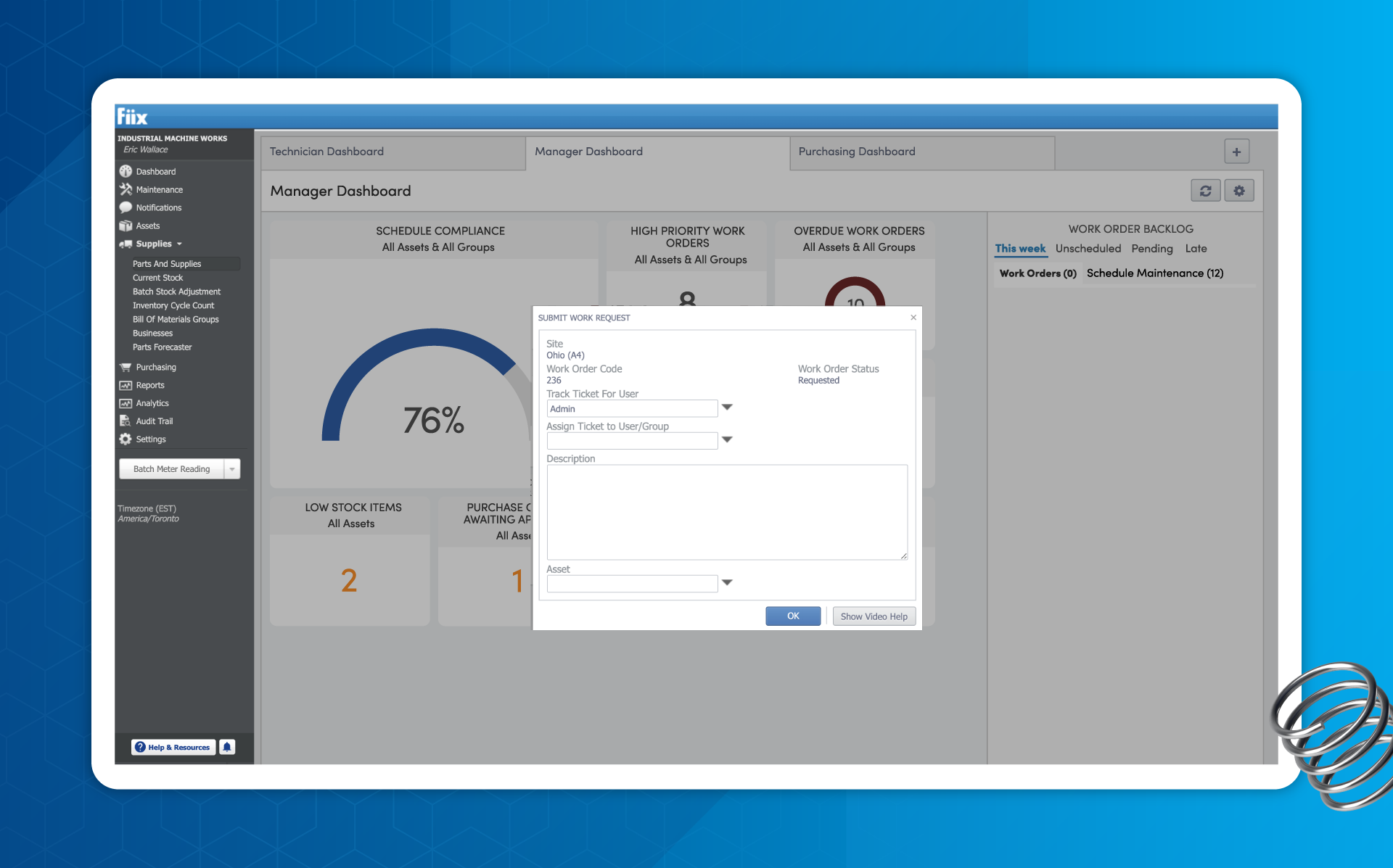
Fiix is a standard cloud-based CMMS from Rockwell Automation. Its biggest differentiator is AI and connected assets. Fiix AI turns maintenance data into recommendations and prioritized work, while FactoryTalk Optix links assets directly to your CMMS for strong condition-based maintenance and predictive workflows.
It's a great fit if you want a reasonable deployment timeline, appreciate good support, and have a strong focus on asset reliability — and do not mind being softly locked in to Rockwell’s automation ecosystem.
Users rate Fiix 4.6/5 on G2 (477 reviews) and 4.5/5 on Capterra (628 reviews). Reviewers most often praise ease of use and navigation, followed by customer support during implementation. The recurring complaints point to custom report creation, slow loading with large data sets, and limited customization options.
Key features
- Asset management: Track, control, and optimize asset performance from a single hierarchy. Asset histories and QR code scanning give technicians instant context in the field.
- Work order management: Create, complete, and record work from desktop or mobile in a simplified workflow. The process is designed to run start to finish without leaving the app.
- Fiix AI: Turns your CMMS data into intelligent action by surfacing patterns and recommendations across maintenance records. It helps you prioritize work instead of digging through reports to find it.
- FactoryTalk Optix: Connects assets directly to your CMMS for condition-based maintenance. Machine data triggers work automatically, so you act on actual asset condition rather than a fixed calendar.
- Fiix Mobile: Lets technicians manage maintenance from anywhere, at any time. Mobile access is central to the platform rather than an add-on module.
- Parts and supplies management: Tracks inventory levels so the right parts are available when work is scheduled. Fewer stockouts means fewer jobs stalled halfway through.
- Integrations and the Fiix app exchange: Connect your CMMS to ERP, IoT, and other business systems to share data across your stack. The app exchange offers pre-built tools that extend the platform without expensive custom development.
Pricing plans
Fiix publishes transparent, tiered pricing with a genuinely free entry point:
- Free ($0, limited users): Includes 25 active PMs, unlimited service requests, work orders, downtime tracking, asset management, inventory and parts, the mobile app, and calendar access.
- Basic ($45/user/month): Adds unlimited PMs, reports, resource-based scheduling, user certification tracking, pass/fail inspections, and access to email, phone, and success team support.
- Professional ($75/user/month): Adds multi-site management, Fiix Foresight, purchasing and RFQs, nested PMs, multi-asset work orders, inventory cycle counts, advanced notifications, and custom analytics and reports.
- Enterprise (Custom): Adds failure codes, a customizable interface and workflows, the Fiix Integration Hub, custom API integrations, e-signatures, audit trail, and single sign-on.
Two add-ons are priced on request:
- The Lite License grants limited access to operators and frontline teams completing assigned tasks, and must be combined with a Basic, Professional, or Enterprise plan.
- Fiix MAX is an AI maintenance assistant that answers questions about assets, work orders, and parts usage using your own maintenance records; it requires a Professional or Enterprise plan and can't be added to Lite License users.
What users like about Fiix
- Work order management is the standout, with reviewers noting the full start-to-finish flow. [“Fiix is most helpful with job orders. You can do a complete job order from start to finish. It's also very easy to use once you are familiarized with Fiix by their easy-to-understand training courses.” — Bjorn, G2]
- The mobile app and interface get praised for being intuitive and fast to navigate. [“The accessibility of Fiix CMMS via mobile is a standout feature for me, as it keeps me connected and able to manage tasks on-the-go. The user interface of Fiix CMMS is another highlight; it's intuitively designed, well laid out, and makes navigation effortless, which is essential for getting through my daily tasks quickly.” — Aidan, G2]
- Implementation support is a reason the platform stays approachable. [“The platform is very robust, allowing for many different industries and use cases. It can be pretty overwhelming at first; however, the support you receive from the Fiix team makes it very approachable. They will help you through the process of implementation, taking a lot of the grunt work off your plate.” — Ethan, G2]
- Teams report measurable productivity and collaboration gains after rollout. [“I like how efficient Fiix has made our maintenance team. We have seen a significant increase in productivity and collaboration between departments since implementing our Fiix CMMS.” — Verified User in Manufacturing, G2]
What users dislike about Fiix
- Custom reporting and dashboards are the most common frustration. [“I think Fiix CMMS could improve its system performance and customizable reporting options. I'd like to see enhancements in the mobile app, particularly in making it faster and more responsive when loading work orders. Also, having more flexibility to customize dashboards and reports would be beneficial.” — Kumar, G2]
- Performance slows with large data sets, and the mobile app can struggle on weak connections. [“The reporting features are a little bit complex to customize initially. Sometimes the mobile app has sync issues if the internet connection is weak. The system becomes a little slow when loading very large data sets. Customer support sometimes takes time to reply to technical queries.” — Gaurav, G2]
- Some reviewers want a more user-friendly admin experience. [“Fiix could have a more user-friendly management panel.” — Mehmed, Capterra]
- The shared table structure for inventory and assets creates friction. [“The Inventory and the Equipment Assets share the same table, which causes several other issues such as a UI issue when viewing the Asset or Parts and Supplies Forms.” — Sam, Capterra]
The verdict: When to opt for Maintenance Connection vs Fiix?
Choosing between these two often comes down to two questions: where your data needs to live, and how much you're willing to pay for mobile.
Opt for Maintenance Connection if: You operate in a regulated industry like pharmaceuticals, healthcare, or utilities, where e-signatures, procedure versioning, and audit trails aren't optional extras. Furthermore, if local data control is a regulatory requirement, the decision is already made. Just budget for the mobile add-on and a one-year minimum contract.
Opt for Fiix if: You're a manufacturer moving maintenance to the cloud and want AI doing some of the analytical work. Its insights tools flag at-risk work orders and forecast parts needs automatically, and mobile is included at every tier — including the free plan, which lets you test the platform before committing budget. The trade-off is no on-premises option and reporting that reviewers find tricky to customize.
While both have good use cases, they also come with issues that are hard to overlook. Maintenance Connection's clunky interface on both desktop and mobile slows down already lengthy implementation and adoption. Besides some reporting and mobile syncing issues, Fiix has fewer glaring flaws, but it is a poor choice if you are not interested in Rockwell’s automation ecosystem.
Luckily, there is no need to compromise. Limble can cover all of those gaps — with full asset hierarchies, compliance-ready records, seamless mobile experience, and a more open ecosystem for companies running condition-based and predictive maintenance.
Limble: A better alternative to Fiix and Maintenance Connection
Maintenance teams are sick of trade-offs. They need robust solutions with powerful features, but do not have months or years to implement, set up, and learn the software.
Limble is a maintenance solution for modern enterprises built around this notion. You get enterprise depth, without the learning curve tax:
- Reports that are easy to configure: Both platforms get flagged for rigid, hard-to-configure reporting. Alongside pre-built CMMS reports and dashboards, Limble lets you build dynamic reports and custom metrics using an intuitive widget builder.
- Value in weeks, not years: Enterprise CMMS implementation often takes 6 to 12 months. Limble customers often see value in the first month, thanks to our structured onboarding process and 24/7 hands-on support.
- An amazing mobile app: Offline mode, mapping, and QR code scanning come standard. Technicians can search assets by name, ID, or QR code, navigate asset hierarchies, and jump straight into work orders without digging through menus. Simple, intuitive, and without the constant performance issues you often experience with other tools.
- Modular predictive maintenance: Plug-and-play condition monitoring sensor setup with real-time actionable data on asset condition and failure modes. Integrations with AssetWatch, Augury, Aveva, Monnit, Samsara, and more.
- Practical AI: AI is built into everyday workflows, not added after the fact. PM builder, scheduling optimization tips, MCP server, resource forecasting, anomaly detection, and more.
To wrap things up, here is a snippet of how maintenance departments across industries use Limble to streamline asset management:
- Powder Mountain, one of the largest ski resorts in North America, struggled to keep up with inspections, preventive maintenance, and parts tracking for their expanding lift system. With Limble, they were able to track and organize over 10k parts and assets, improve response time by 50%, implement predictive maintenance strategies, and simplify audits.
- Renfro Foods needed digital maintenance records for federal, state, SQF, and customer audits, and their insurer had flagged the lack of a robust programme as a risk. Onboarding was smooth enough that their president said he was happily surprised by it, and 60 employees now produce 100,000 jars per shift with audit-ready documentation at their fingertips.
- Liberty Safe was spending thousands a week on expedited parts shipping and losing hours searching the spares room. Within 6 months, shipping costs dropped close to zero, downtime on critical assets fell 75%, and output rose by 38%.
All maintenance management software has its pros and cons. However, only Limble offers enterprise-grade power that is both affordable and intuitive enough to use without months of setup and training.
Book a demo today to learn more, or estimate potential costs with our online pricing calculator.